BuildProof Smart Inspection Mobile App
AI-assisted construction inspections without paper workflows.
A field-ready mobile app that unifies defect evidence, AI suggestions, offline sync, report review, and more into one structured workflow for assessors. The design reduced documentation time by 72% and moved report compilation from office work to on-site submission.
7 min read
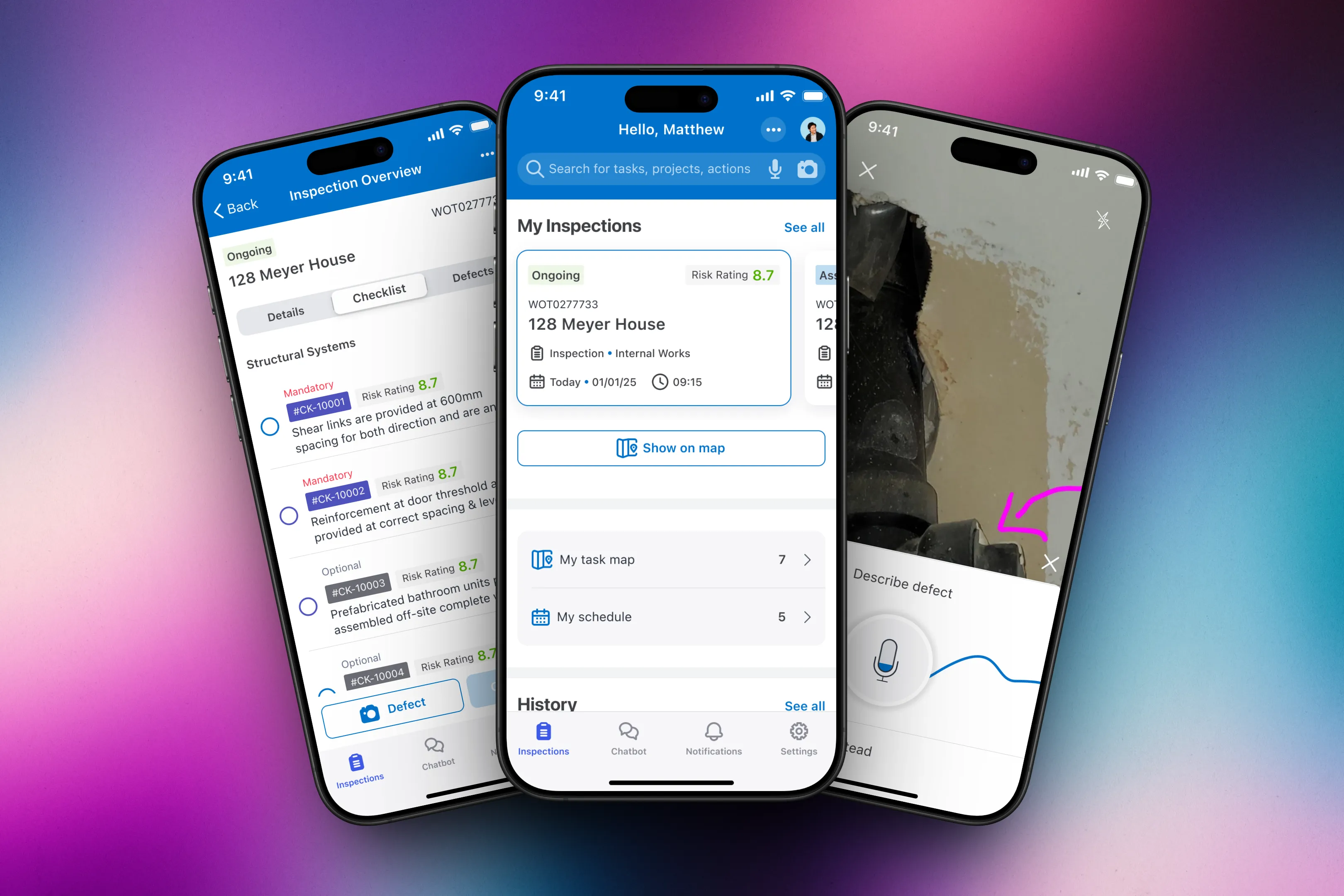
Impact
Inspection work moved from scattered field notes to one reviewable mobile workflow.
The design connected checklist decisions, defect evidence, AI suggestions, offline sync, and report review so assessors could complete structured inspection work on site.
- Defect documentation dropped from about 12 minutes to under 3.5 minutes in testing.
- Report compilation moved from 3.5 hours to 28 minutes.
- Final-round task completion reached 94% across core inspection flows.
A quick summary
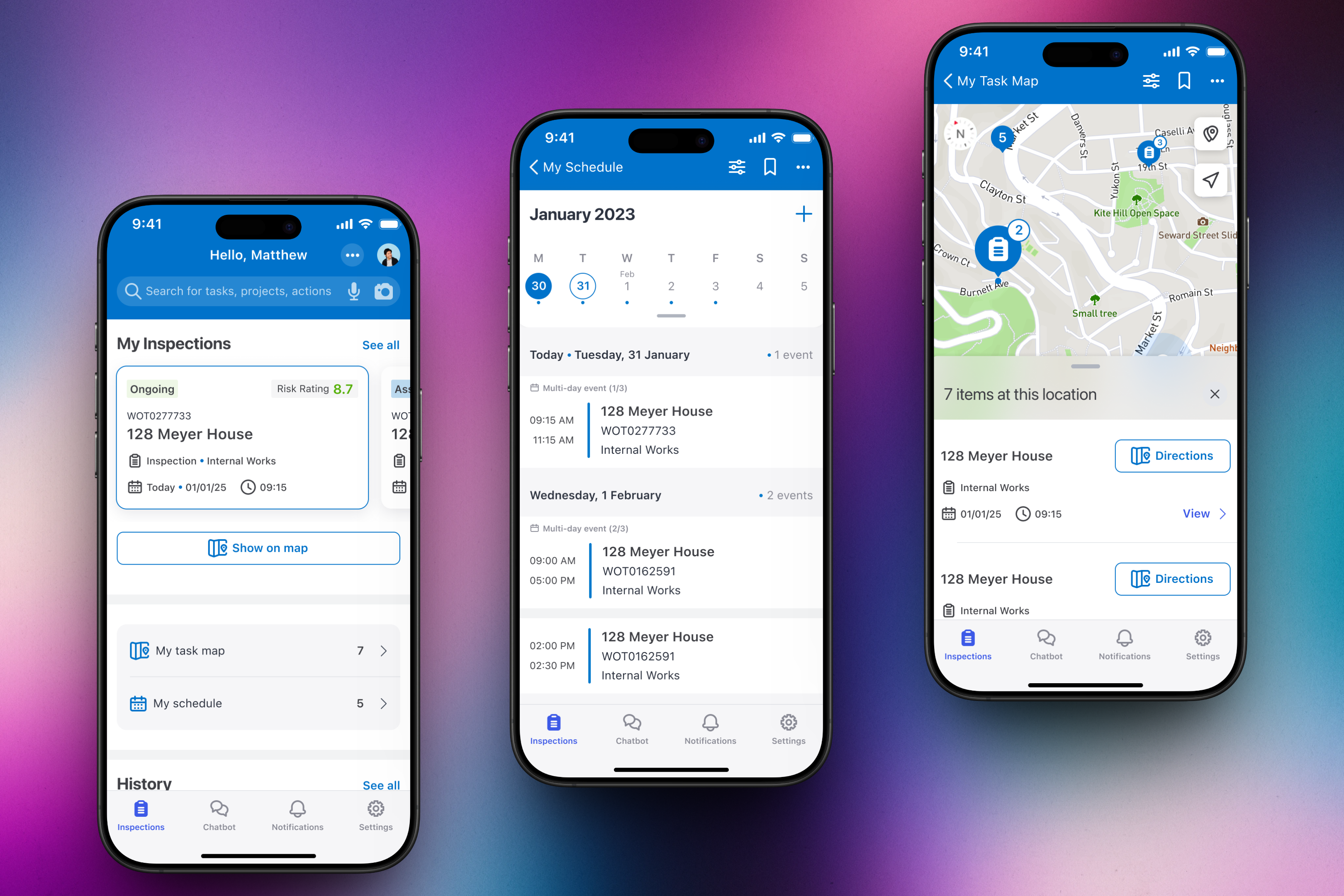
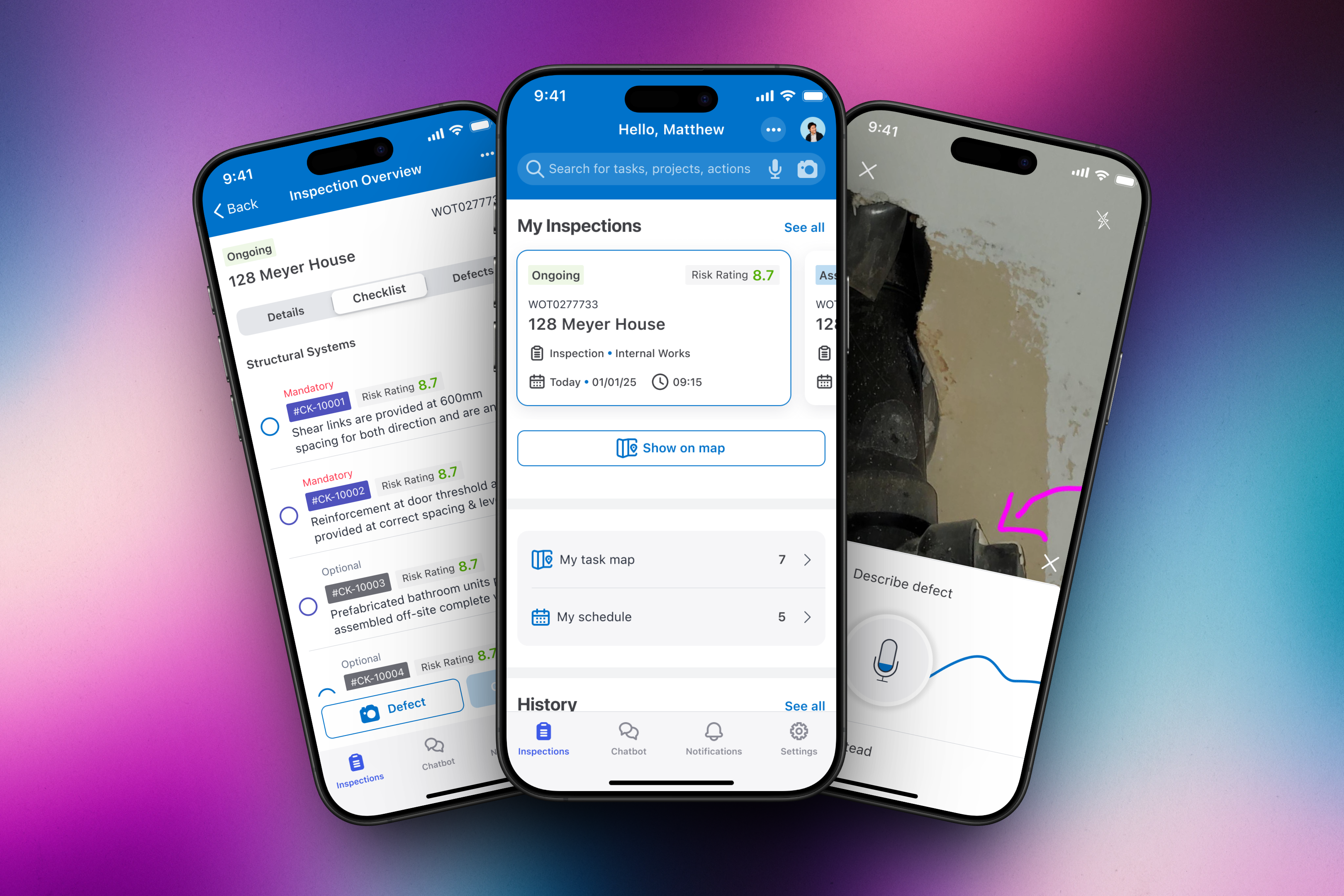
Daily command centre
Home, schedule, and task map kept today's inspection work visible.
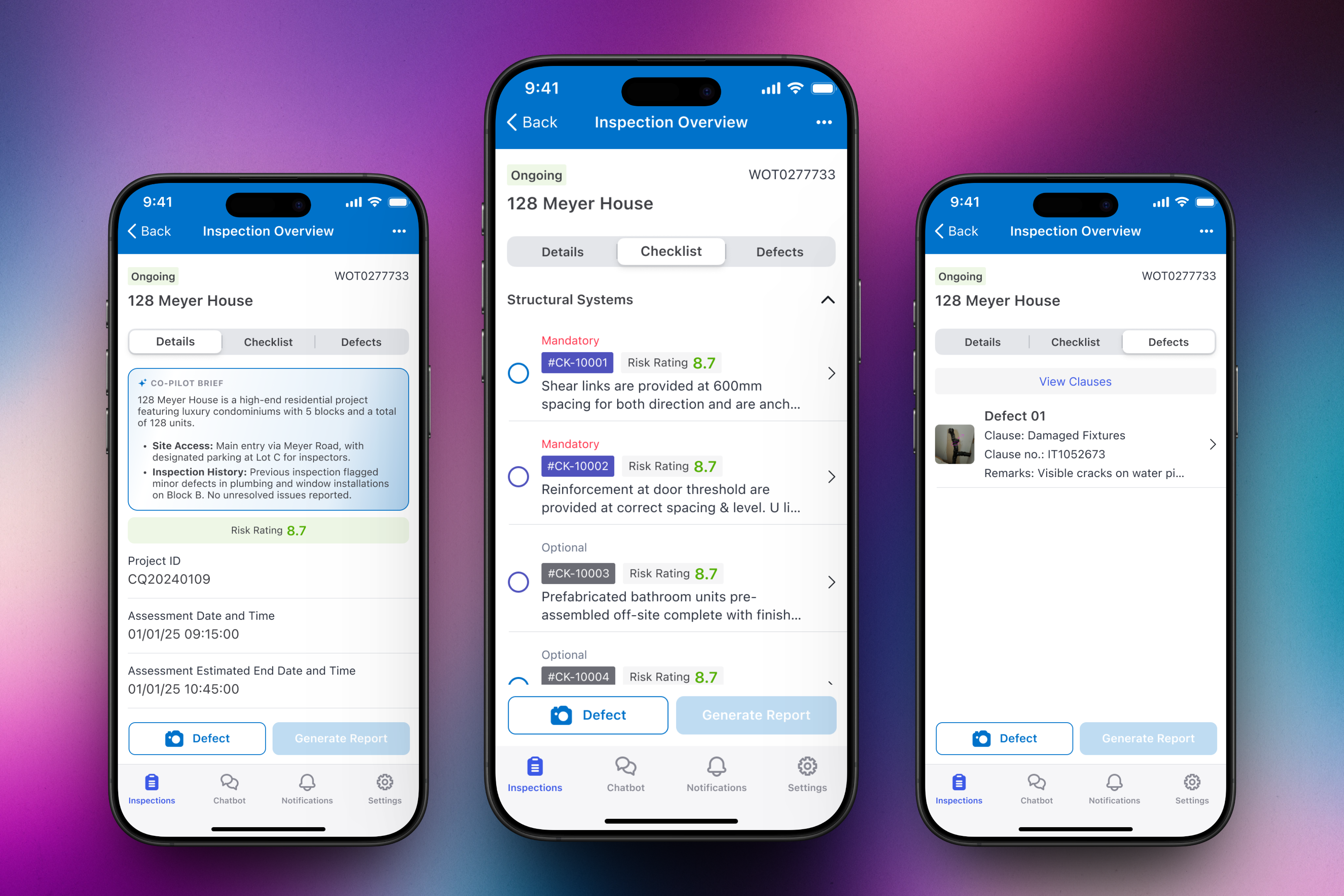
Inspection workspace
Details, checklist, and defects lived in one workspace.
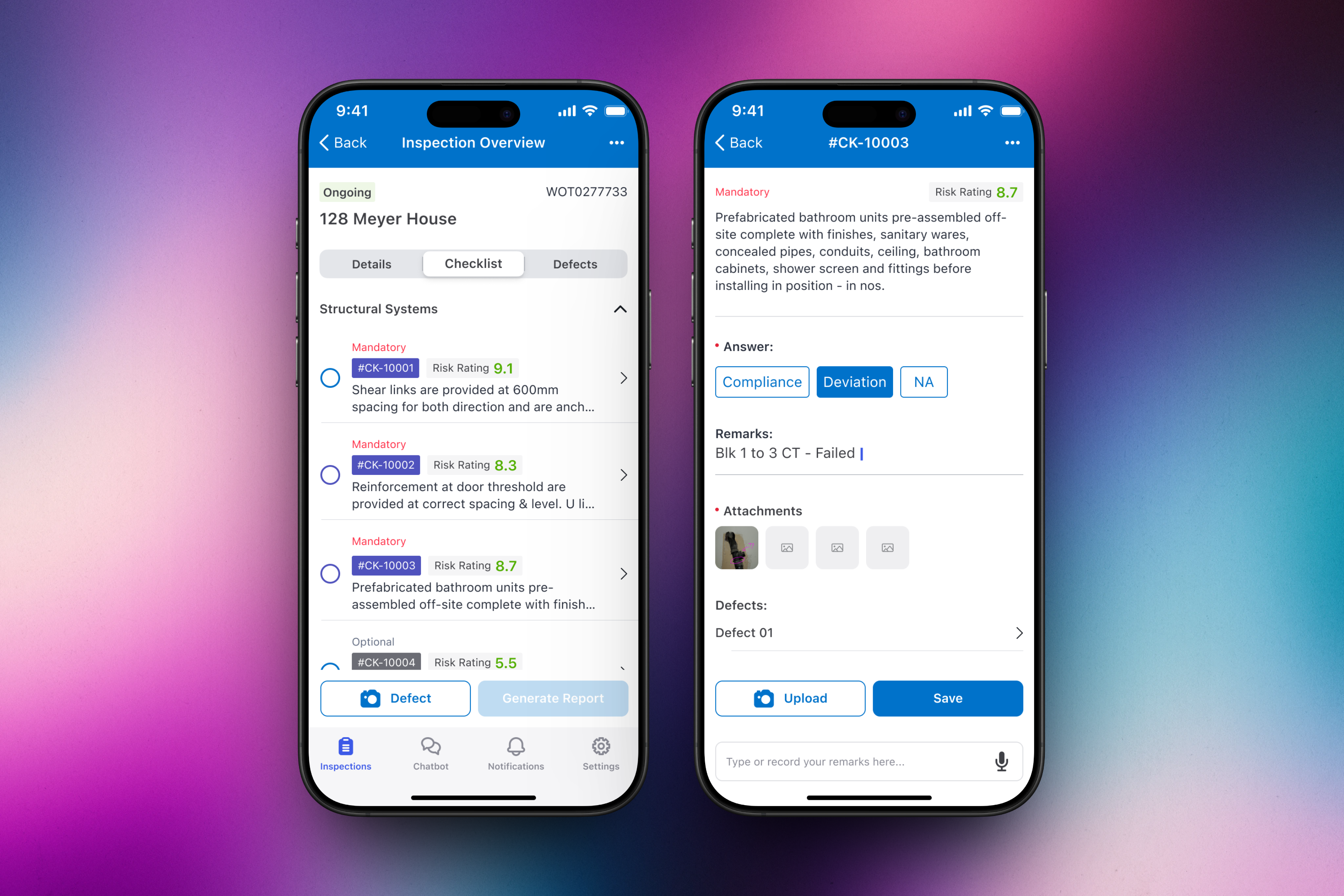
Structured checklist
Checklist items supported decisions, remarks, attachments, and linked defects.
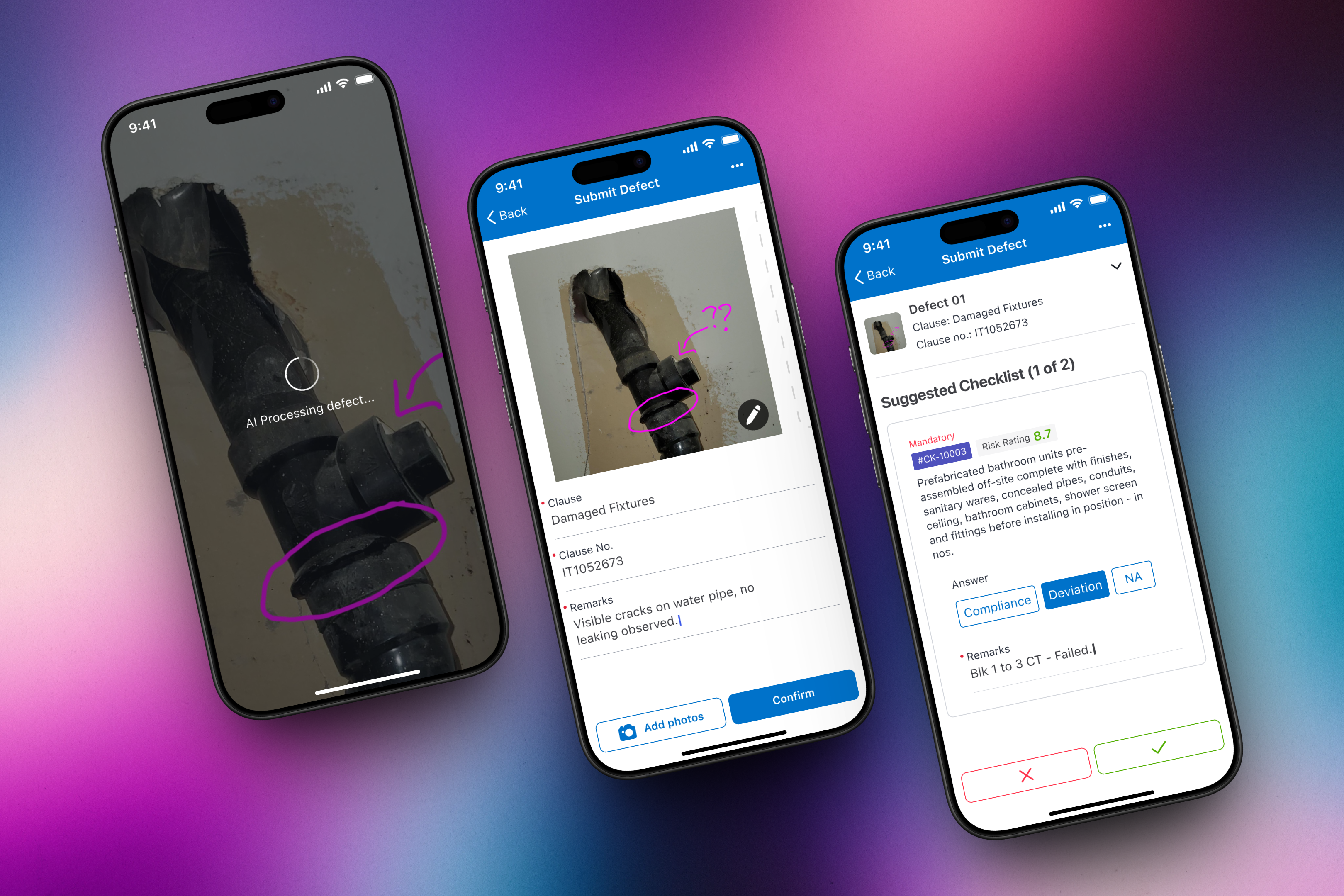
AI-assisted defect filing
AI suggested records and checklist links; assessors confirmed official actions.
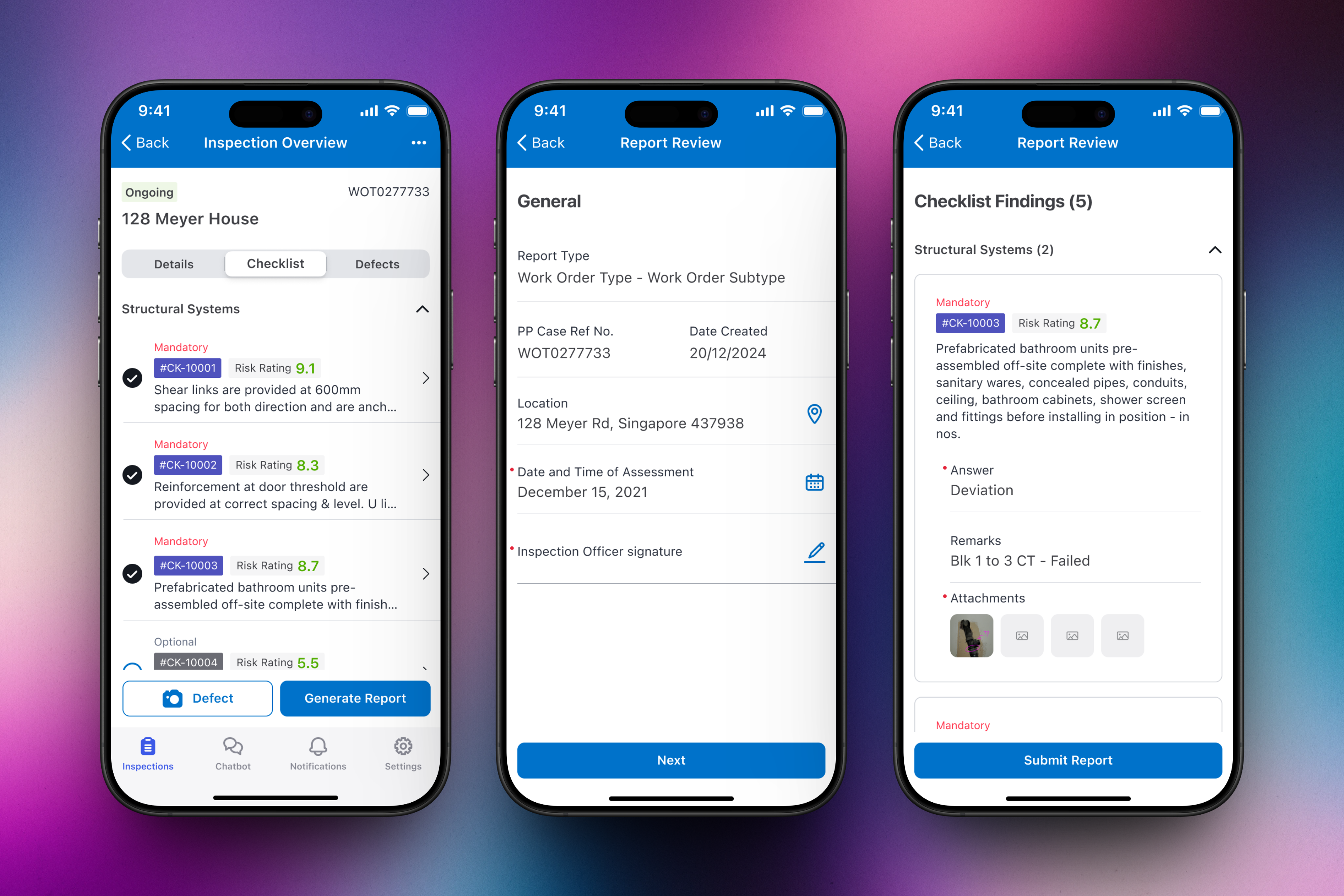
On-site report review
Reports assembled project data, findings, remarks, attachments, and evidence.
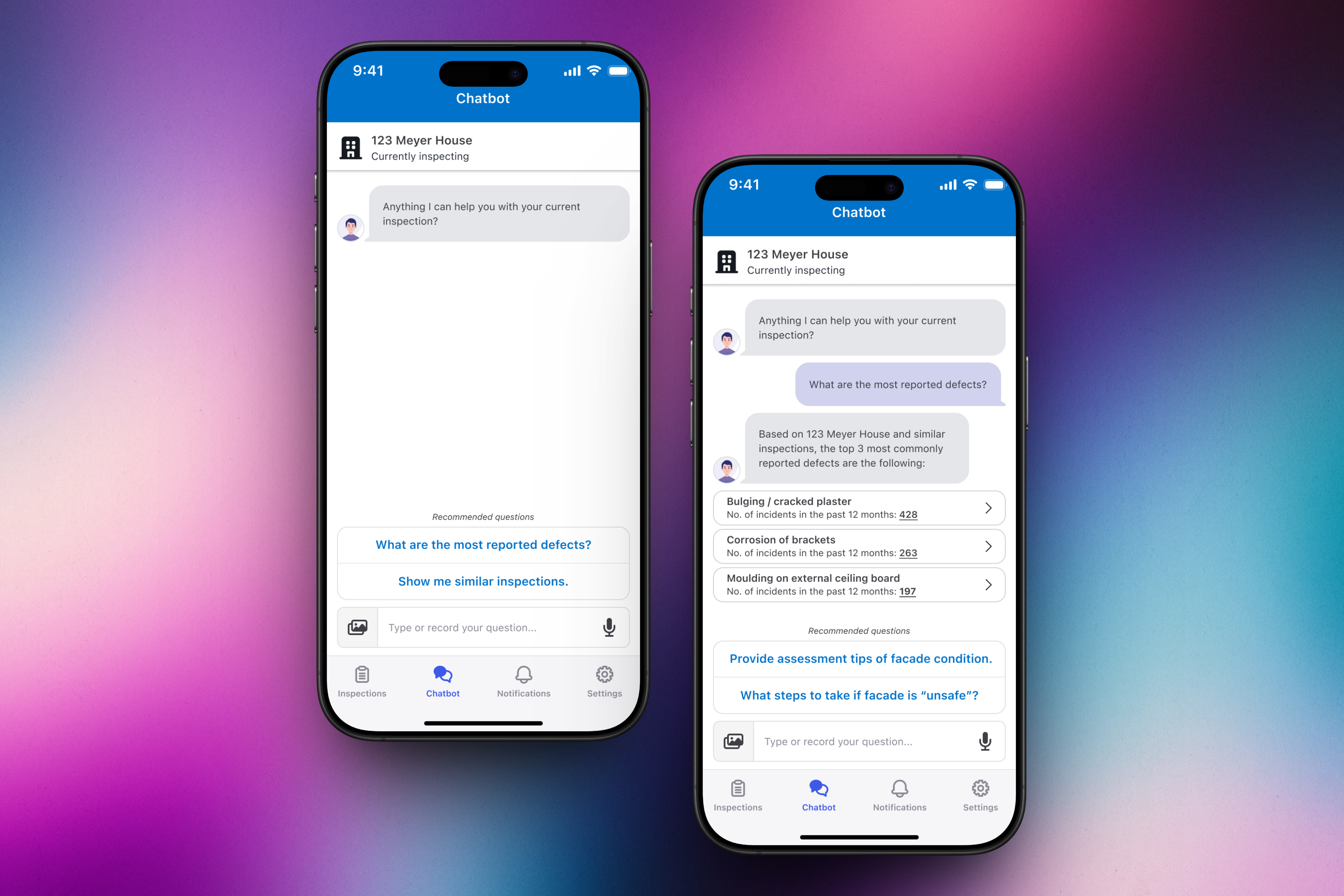
Contextual copilot
Recommended prompts kept AI guidance bounded to inspection context.
Have at least 7 minutes? Read the case study below.
BuildProof Smart Inspection helps assessors keep evidence, judgement, and reporting together on site.
Replacing paper in the field. Government assessors inspecting construction sites faced an inefficient workflow split across printed sheets, personal phone cameras, handwritten notes, and manual office-based report compilation. BuildProof Smart Inspection unifies these steps into a field-ready, offline-first mobile tool.
This was part of a larger programme for a Singapore government construction authority . The companion BuildProof Applicant Portal is covered separately.
Context & Problem
Reconstructed evidence risks. Field inspections required high precision. Splicing photo records across personal devices and compiling reports days later created major data compliance risks when construction site conditions changed.
The problem
Structured inspections were being reconstructed after the site visit.
The framework was auditable, but the field workflow split judgement across paper, personal-phone photos, handwritten notes, and office-based report compilation.
Split evidence
Defects needed photos, remarks, classification, and clause relationships, but those records lived in separate tools.
Delayed reporting
Formal reports were compiled later, creating risk when site conditions changed or defects had to be reconstructed from memory.
Unreliable signal
Construction sites could not guarantee connectivity, so a digital tool had to treat offline work as a normal state.
Core Strategic Constraints:
- Offline operation: The application must function without any cellular connectivity on deep-level construction sites.
- Auditable review trail: Retain high assessor control, enabling manual edits and clawback overrides on any AI-generated finding.
- Many-to-many references: Support linking a single physical defect to multiple compliance checklist clauses.
- Immediate compilation: Generate and authorise an official report directly on the device before leaving the site.
The Process: Behind the Scenes
Shadowing assessors in the mud. I spent several weeks shadowing government assessors on-site. We clustered recurring pain points around manual transcription and data loss, identifying that a field tool must operate like a checklist utility first and a camera second.
Interactive Form Prototyping. Using Storybook and React, I prototyped queued offline uploads, dynamic floor plans, and validation check states. This allowed our engineering team to inspect edge-case behaviours—such as mid-sync dropouts—before final build phases.
Deep Dive: Key Design Decisions
Task-Driven Home: Centering the Daily Site Schedule
Spatially orienting the assessor. Rather than opening to a generic search or a list of active building structures, the homepage answers a critical question: what needs to be inspected next? It maps the daily schedule, surfaces site risk profiles, and provides spatial orientation via interactive floorplans.
Contextual Checklists: Reducing Navigation via Inline Accordions
Minimising flow friction. To answer clause questionnaires without losing their physical place on site, assessors use inline expansion cards. The sidebar copilot pre-arms assessors with common deviations and site history notes without dictating the final compliance decision.
Adaptable Layouts: Designing for Mobility and Spatial Navigation
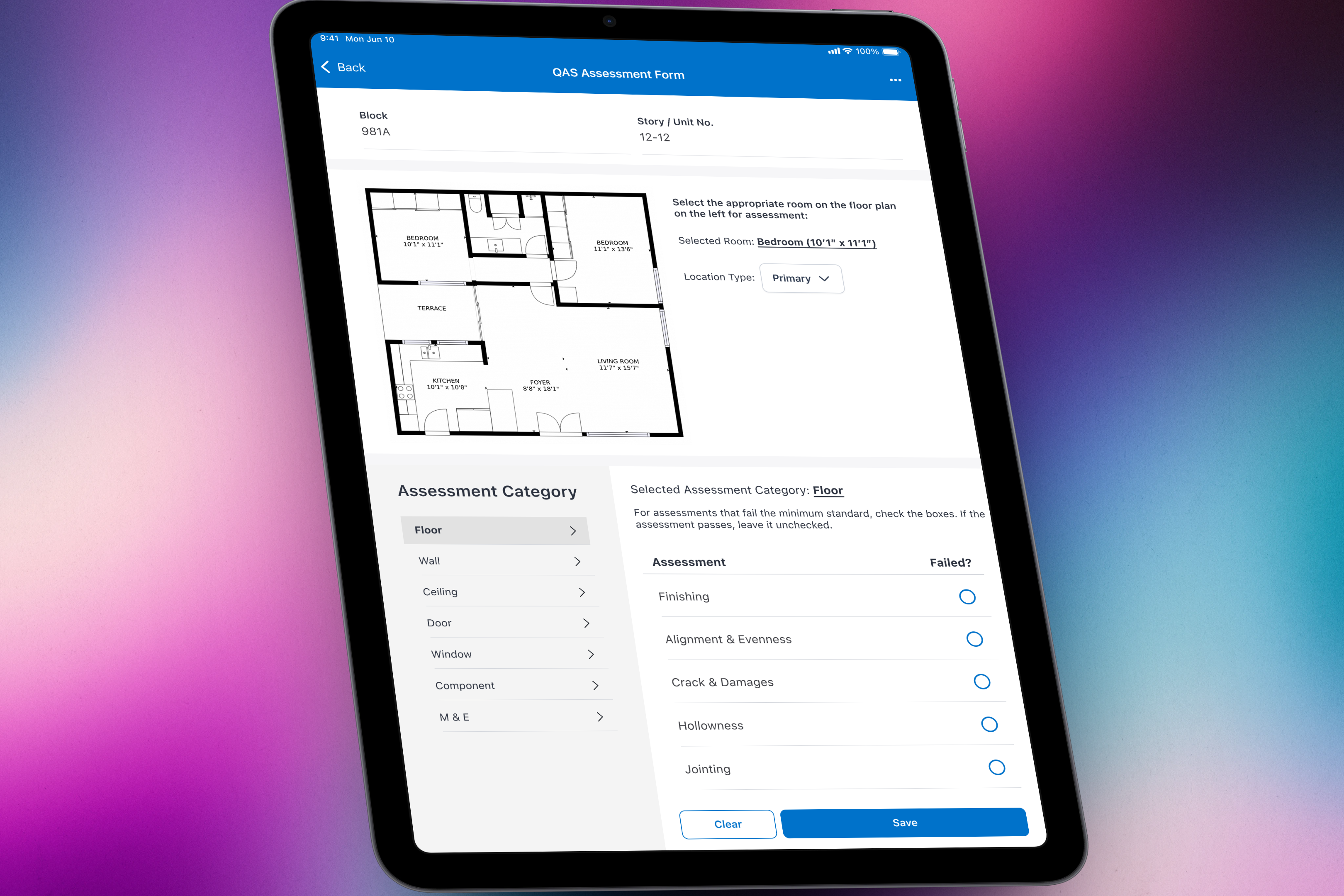
Matching the physical context. While a compact smartphone layout is ideal for handheld on-site documentation, large floorplan reviews require spatial context. We developed an iPad-specific dashboard that keeps architectural floorplans and checklists visible side-by-side.
Review-First AI: Supporting Decision Makers Without Gating Authority
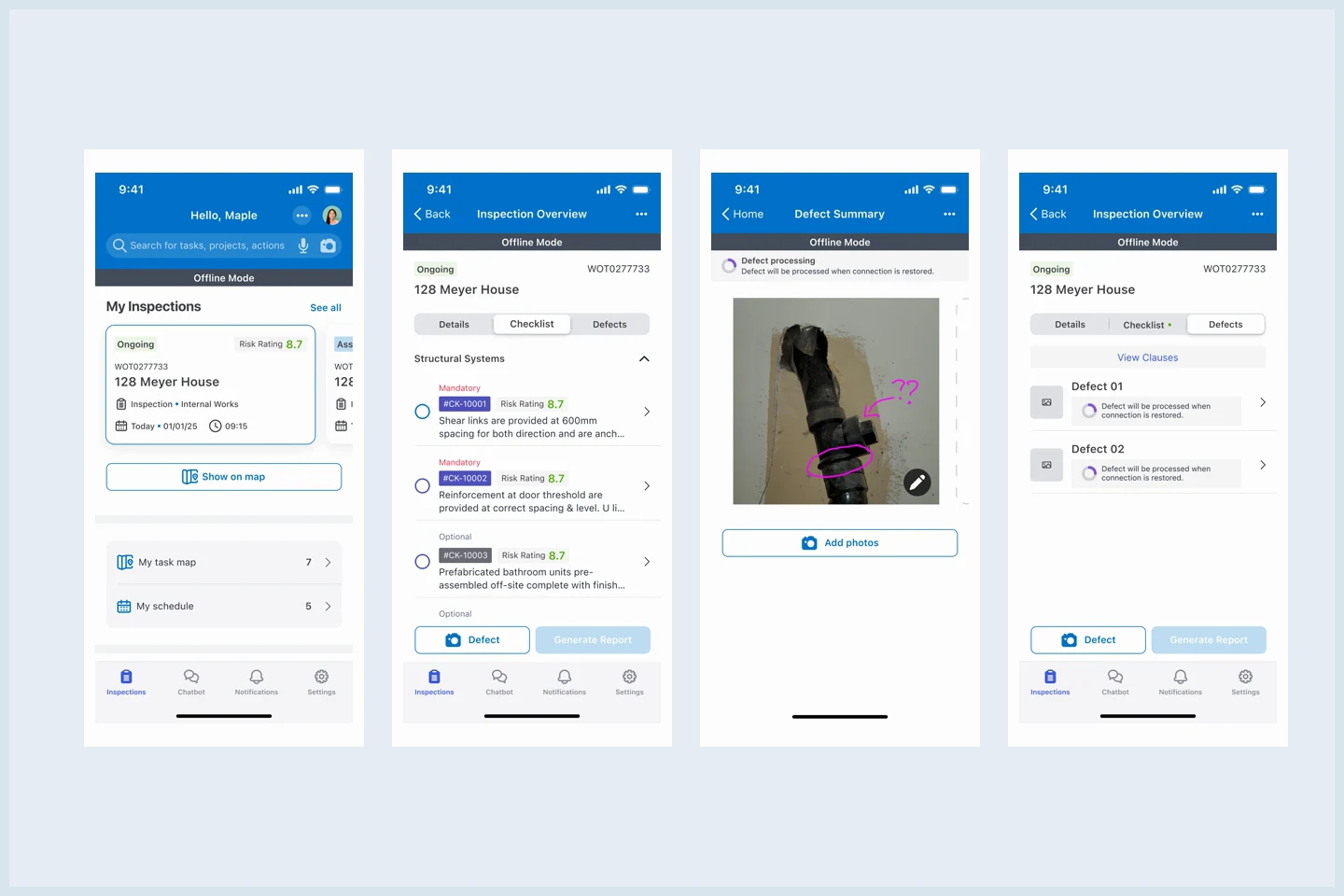
Anchoring AI output. The assessor takes a defect photo, dictates a quick voice comment, and reviews the AI’s suggested classification. The voice step provides a moment of cognitive pause, ensuring the assessor remains the ultimate decision-maker before official log entry.
Calm Offline UI: Designing Offline Mode as the Normal State
Preserving status transparency. Network failures are treated as standard operational behaviour. A persistent, calm sync indicator informs the assessor exactly which records are successfully synchronised, queued in local storage, or failed, preventing redundant field reviews.
Dynamic Copilot: Scoping LLM Advice to Bounded Guidance
Preventing open-ended errors. We avoided open chat windows. Instead, the copilot uses bounded prompt chips that address specific query vectors: common defects on similar structures, compliance examples, or emergency escalation procedures.
Structured Signoff: Unifying Evidence for Handoff
Verifying before submission. The final submission summary organises structured findings, skipped clauses, and photo evidence. The signoff button activates only when all mandatory safety segments are verified, enabling assessors to sign and submit reports on-site.
Impact & Outcomes
Engineering readiness achieved. The designs were compiled and successfully handed off to engineering after a twelve-month cycle. Usability test rounds validated major speed gains across core workflows.
Case study snapshot
The product problem was speed, trust, and field resilience
72%
faster defect documentation
Down from an average of 12 minutes per defect to under 3.5 minutes in testing.
3.5 hrs -> 28 min
report compilation time
End-of-inspection reports moved from office work to on-site submission.
94%
task completion in testing
Across 12 assessors and 3 test rounds covering core inspection flows.
4
AI features designed
Defect detection, copilot brief, clause suggestions, and contextual guidance.
Outcome
BuildProof Smart Inspection gave assessors a single field workflow for structured inspection work.
Testing showed the design could make field documentation faster while keeping official judgement, evidence, AI support, and report submission reviewable.
72% faster
Defect documentation became quicker in usability testing.
Average documentation time dropped from about 12 minutes per defect to under 3.5 minutes.
3.5 hrs -> 28 min
Report compilation moved closer to the field workflow.
Reports shifted from office work to on-site review and submission in testing.
94%
Final-round task completion across core inspection flows.
The testing sample covered 12 assessors across 3 rounds.
Review-first AI
AI features supported assessors without taking authority.
Defect detection, clause suggestions, copilot guidance, and draft language stayed editable and overridable.
Reflection
Earning trust incrementally. In high-precision government workflows, AI cannot act like a magical assistant. It earns credibility by supporting human decision-making in small, predictable moments, staying fully transparent when uncertain, and making overrides simple.
Designing for the worst state. Field tools succeed or fail on their resilience. If a network drop creates visual confusion or data-loss anxiety, assessors will revert to paper notebooks. Treating the offline disconnected state as a normal condition is what made the app viable in active construction zones.
Contents