BuildProof Applicant Portal
Guided applications and self-service inspection booking.
BuildProof's upgraded applicant portal turned a high-stakes construction application into a guided, traceable service flow. By integrating verified login, pre-filled government data, and self-service booking, the redesign reduced manual effort and made the lifecycle visible in one unified workspace.
6 min read
Impact
Applicants got one traceable workspace for applications, payment, status, and booking.
The redesign reduced manual field inventory, replaced separate credentials with verified login, and made application status, actions, messages, and inspection milestones visible in one portal.
- Manual field inventory dropped by roughly 60% in the design.
- National identity and company login replaced separate credentials.
- Inspection booking became self-service instead of email coordination.
A quick summary
Portal entry point
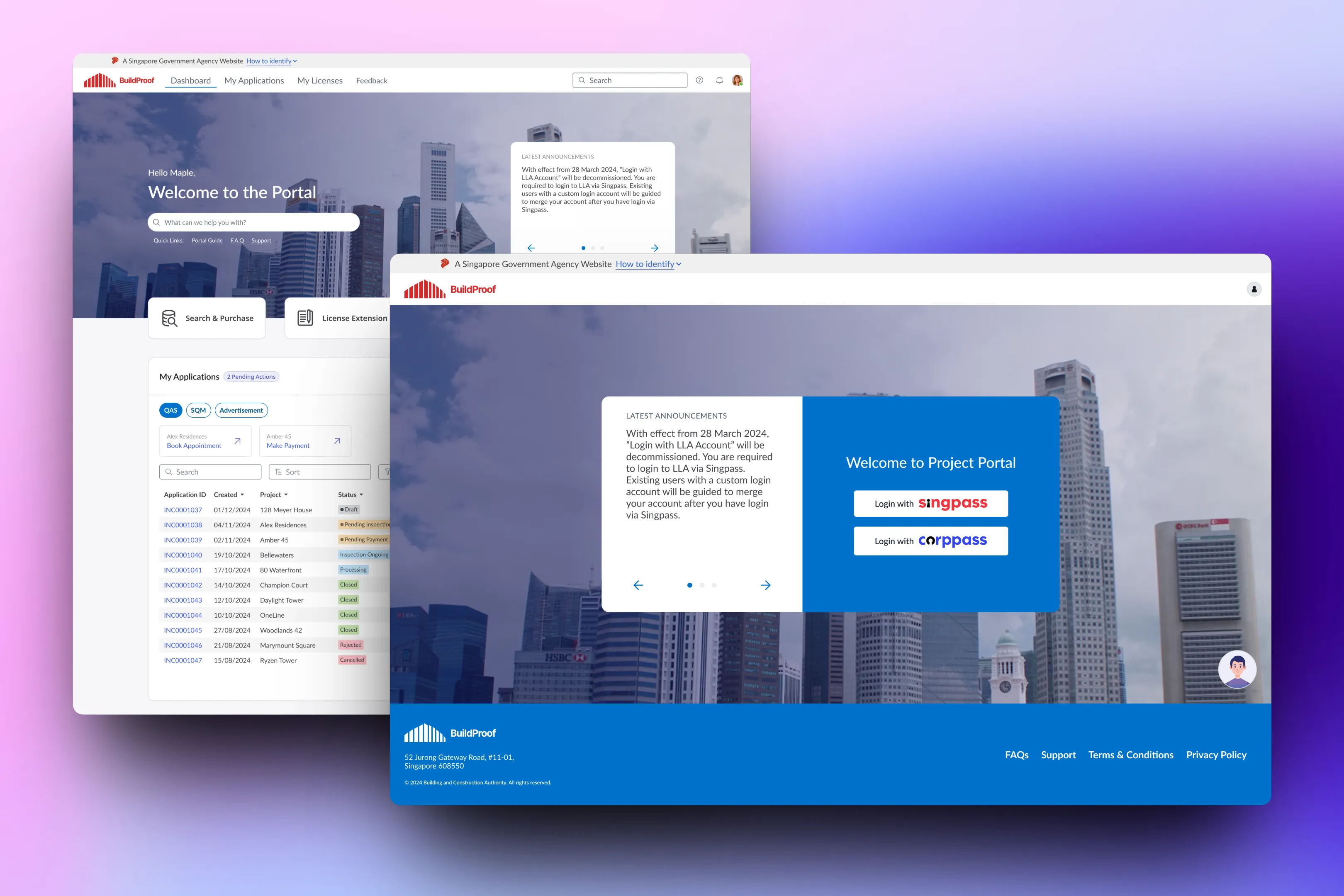
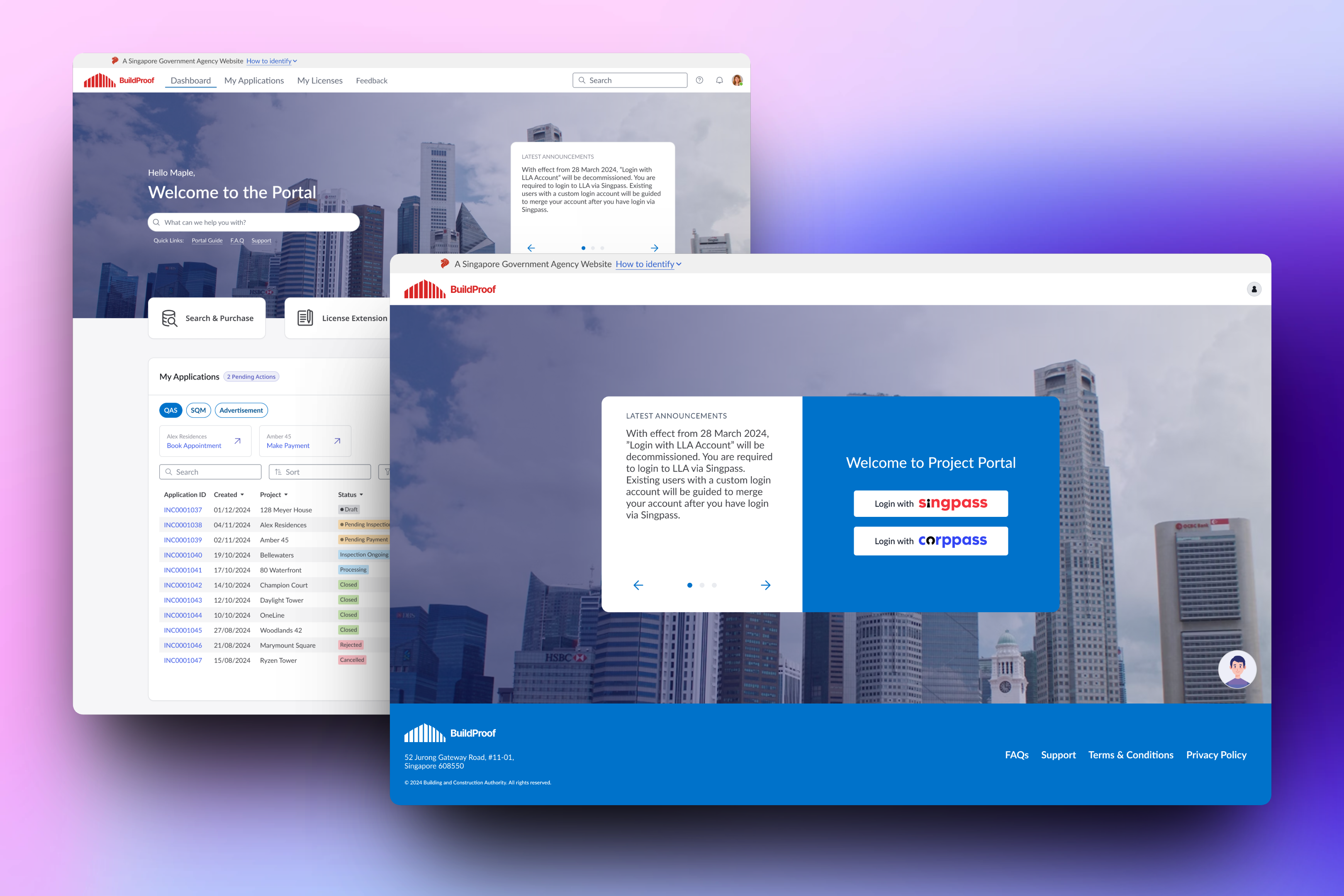
National identity and company login became the front door to the applicant workspace.
Unified dashboard
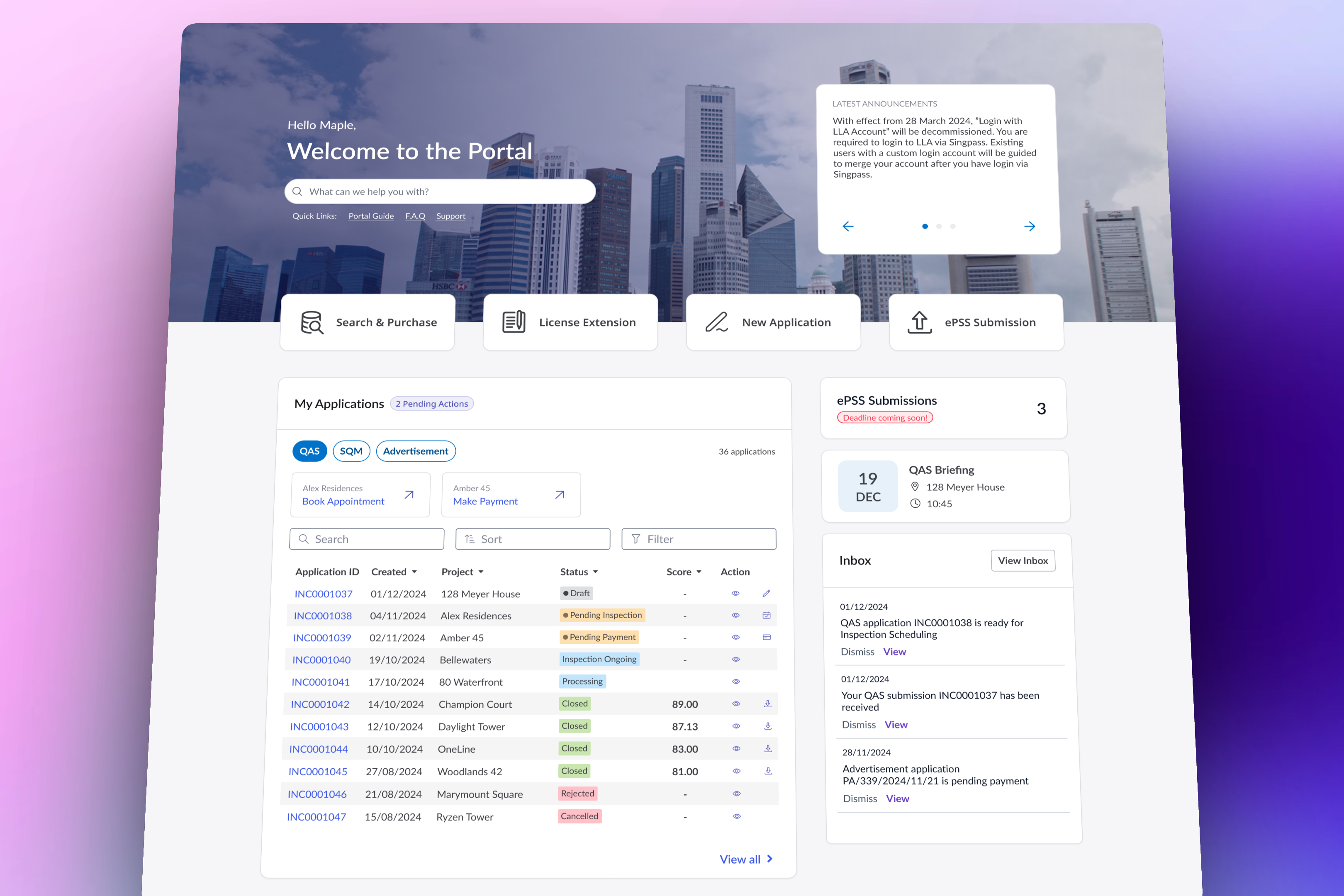
Applications, actions, messages, and inspection milestones surfaced in one view.
Guided application wizard
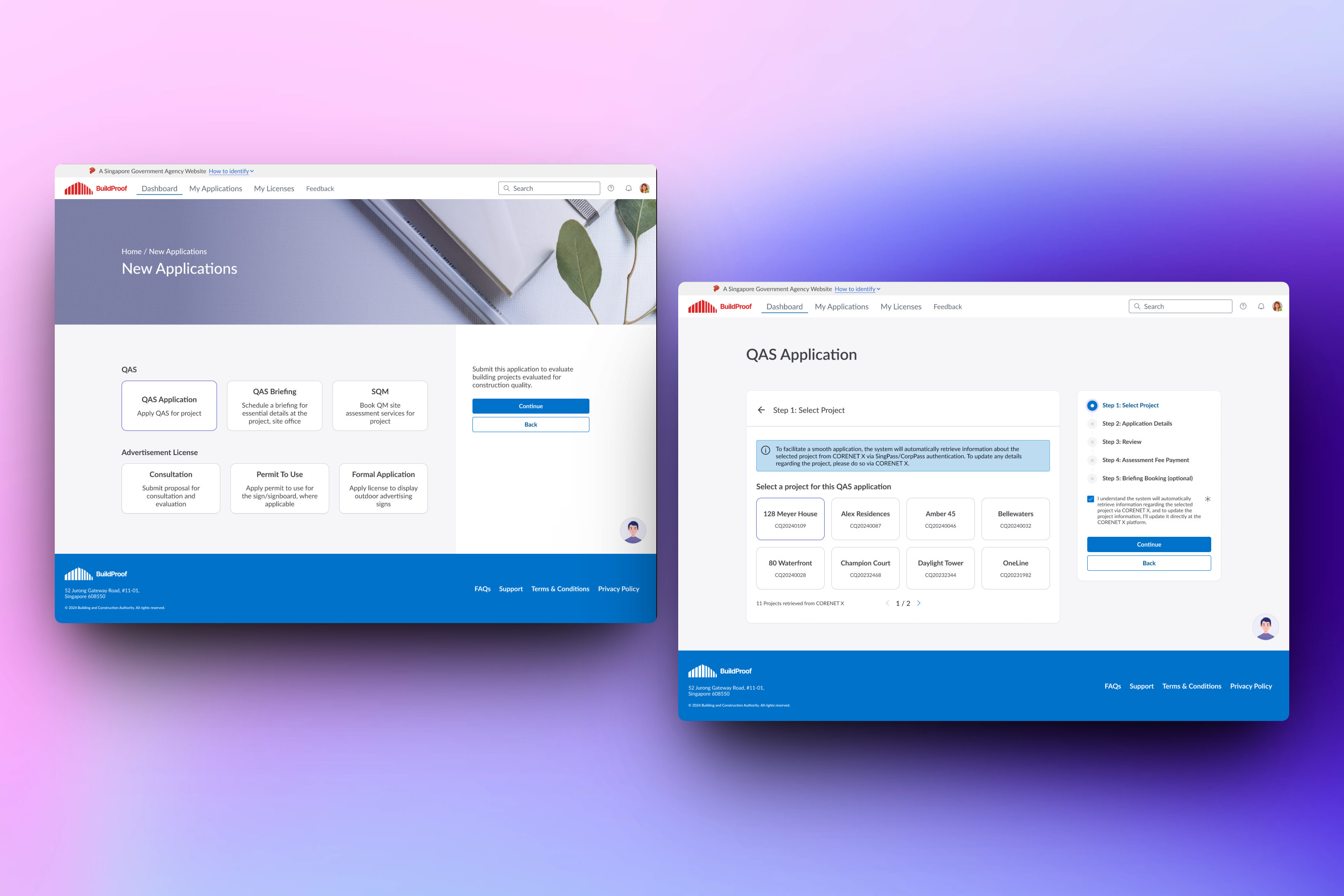
Applicants choose a service, then select a known project from trusted records.
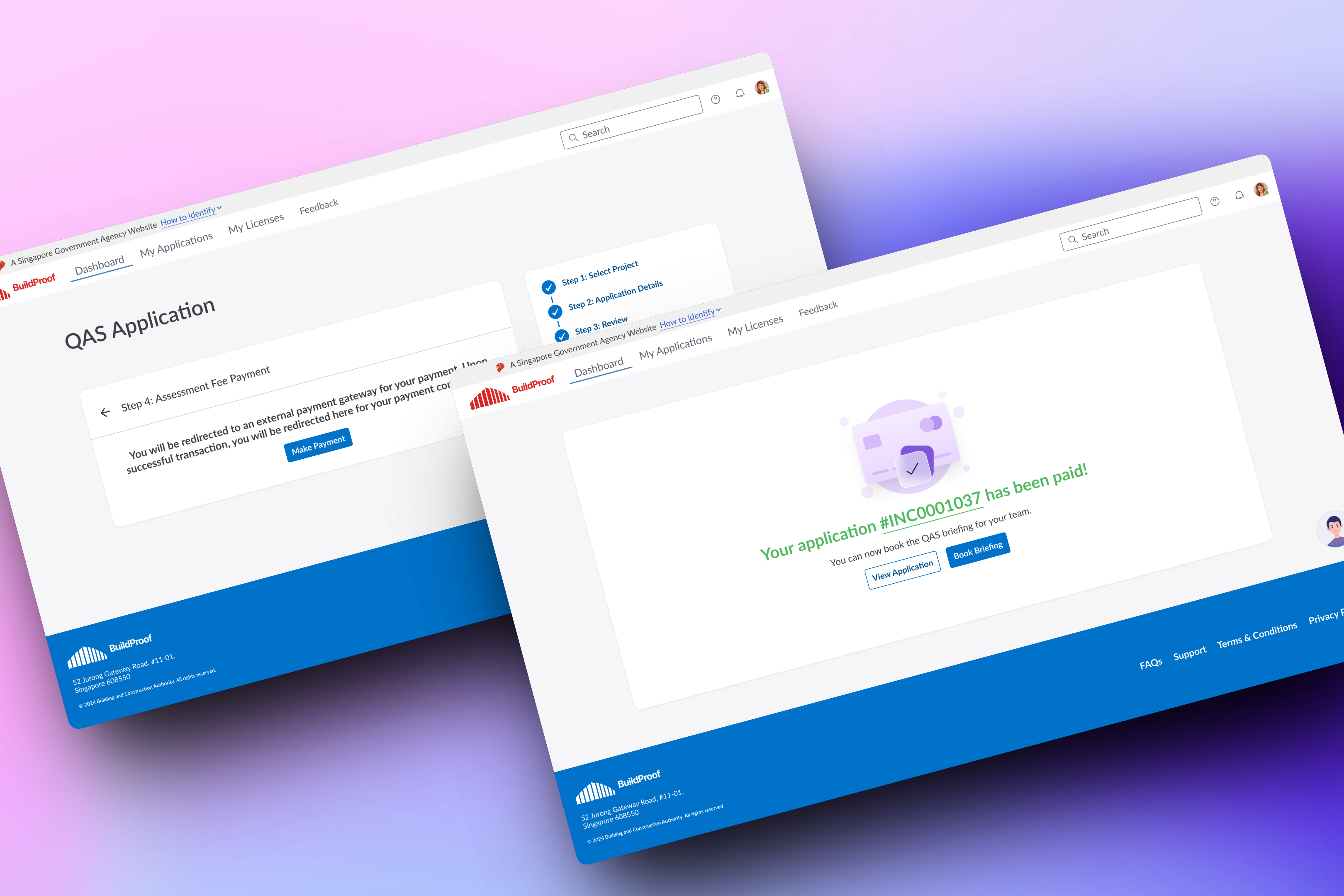
Review and payment
Review, payment hand-off, and confirmation stay part of one journey.
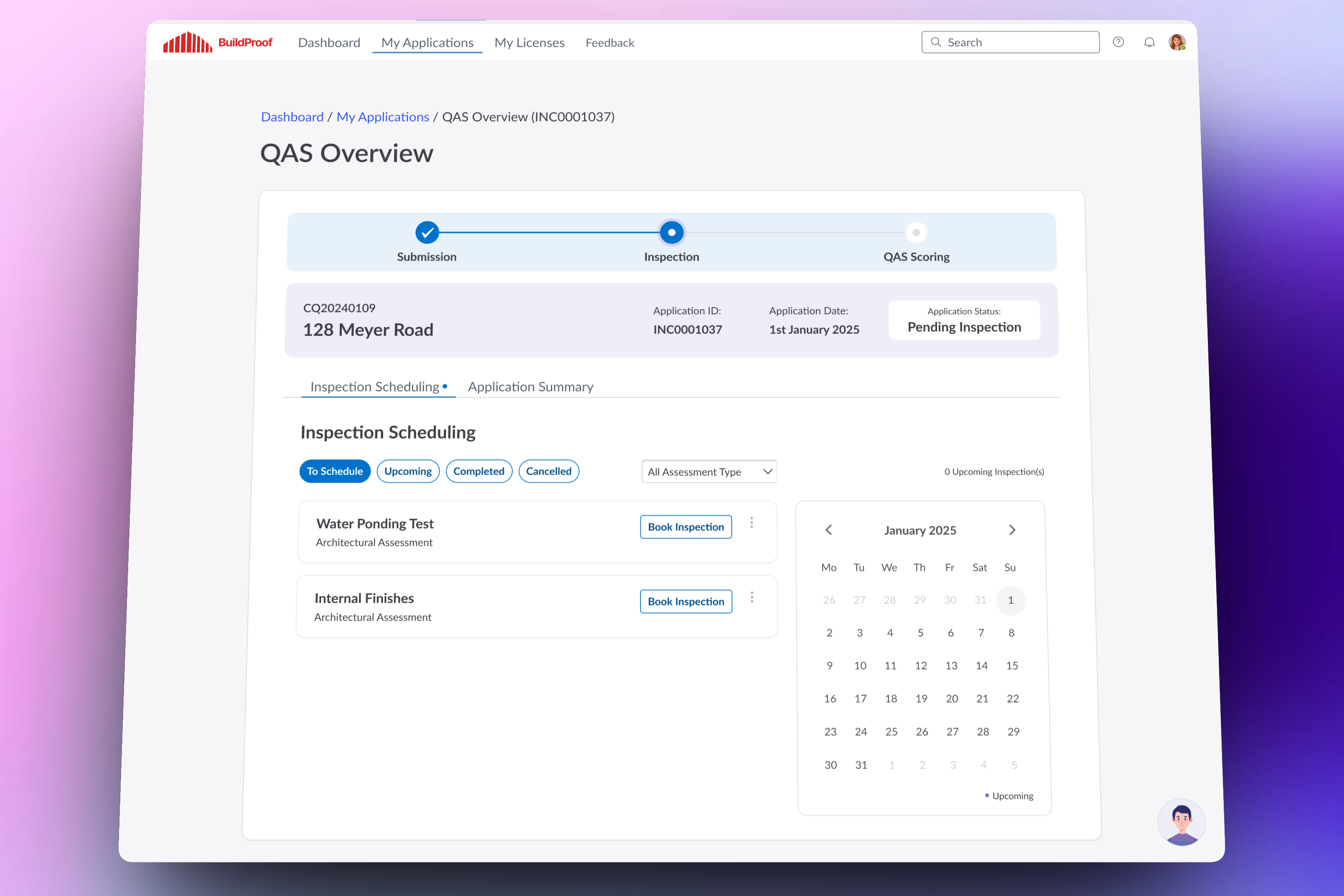
Lifecycle tracking
A live overview shows submission, inspection scheduling, and scoring progress.
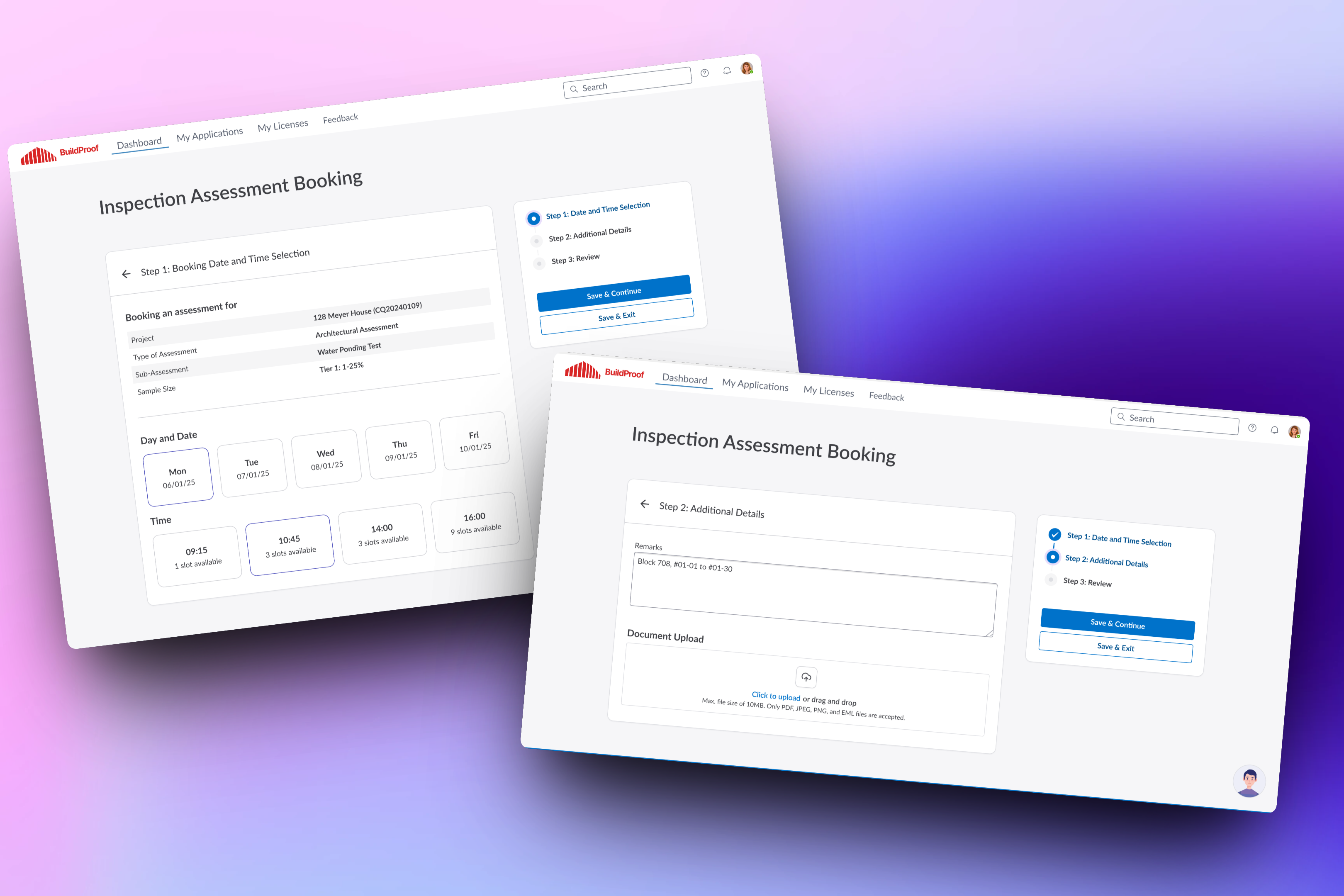
Self-service inspection booking
Applicants choose a slot, add details, upload documents, and continue without email coordination.
Have at least 6 minutes? Read the case study below.
BuildProof Applicant Portal turns a high-stakes construction application into a guided, traceable service flow.
Simplifying complex compliance. Contractors applying for construction quality assessments struggled with legacy interfaces featuring separate credentials, redundant manual entry, and email-based booking coordination. The redesign integrates identity, payment, tracking, and booking into a unified applicant workspace.
This was part of a larger programme for a Singapore government construction authority . The companion BuildProof Smart Inspection Mobile App is covered separately.
Context & Problem
Fragmented compliance workflows. Applicants faced a disjointed interface. Knowing the correct assessment types, sourcing trusted government project records, and coordinating inspection schedules by email created major operational uncertainty.
The problem
A high-stakes government application was split across credentials, forms, email, and booking coordination.
Applicants needed to know which assessment type applied, which project details were trusted, who needed to act next, and how inspection scheduling affected the rest of the application.
Separate credentials
Applicants created manual portal accounts even though verified identity and company records existed elsewhere.
Repeated data entry
Project data already held by government platforms was re-entered manually in dense paper-style forms.
Operational uncertainty
Status, pending actions, messages, and inspection milestones were scattered across email and coordination threads.
No self-service booking
Applicants had to coordinate inspection slots by email instead of seeing availability and requirements in the portal.
Strict Operational Constraints:
- National identity integration: Mandated the use of standard national Singpass and CorpPass login interfaces.
- Trusted database retrieval: Pull official construction records from government platforms to avoid manual re-entry.
- Auditable tracking: Retain a secure, unalterable trail of submissions, payments, and scoring adjustments.
- Differentiated slot rules: Accommodate separate rules for normal, express, and virtual inspection bookings.
The Process: Behind the Scenes
Auditing the service lifecycle. I led the information architecture design and service blueprinting passes. By mapping the full application lifecycle, we separated data the government already holds from inputs that require direct applicant judgement.
Storybook Handoff. I maintained high-fidelity, interactive prototypes in Storybook and React. This allowed business analysts and government stakeholders to test conditional form validation, slot calculation, and payment redirects under realistic test conditions.
Deep Dive: Key Design Decisions
Trusted Onboarding: Verified Login Unlocks Automated Data Retrieval
Reducing intake friction. By replacing manual user accounts with national identity and company login patterns, we established immediate trust. Tapping into external registries allows the system to pre-fill known project parameters instantly, preventing entry errors.
Actionable Dashboard: Merging Status, Tasks, and Messages
Replacing email chasing. After authenticating, contractors land on a centralised dashboard. This replaces scattered email updates by exposing active assessments, clear status badges, pending tasks, and official messages in a single above-the-fold interface.
Guided Wizard: Collapsing Field Volumes via Step-by-Step Validation
Simplifying input density. The redesigned wizard organises application steps into five logical stages. Pre-filling official government records reduces the manual field count significantly, transforming a dense regulatory form into a structured, easily reviewable wizard.
Application flow
Five focused stages
01
Select project
Choose from projects already in the government database.
02
Application details
Add judgement-based details and target score.
03
Review
Check official and applicant-entered data together.
04
Payment
External payment gateway with clear confirmation.
05
Briefing booking
Optional on-site briefing scheduling.
Scheduling Integration: Self-Service Booking with Policy Guardrails
Replacing manual scheduling. The self-service booking engine allows applicants to select slots, upload supporting blueprints, and review documentation requirements. The system automatically enforces policies, balancing normal, express, and virtual slot constraints in real time.
Unified Checkout: Preserving Review States Across Portals
Bridging payment handoffs. The review portal gathers official records, custom inputs, booking slots, and fee calculations. This ensures complete transparency before redirecting the contractor to the external government payment gateway.
Impact & Outcomes
Twelve-month development handoff. The comprehensive portal design was completed and prepared for engineering. It keeps the high-stakes regulatory process completely auditable while significantly reducing manual friction for applicants.
Case study snapshot
The redesign reduced manual effort and made the lifecycle visible
~60%
fewer manual fields
Design inventory estimate after moving known project data out of manual entry.
5
step application wizard
Replaced a dense paper-style form with clear progress and review.
1
applicant dashboard
Applications, actions, messages, and inspection milestones in one surface.
3
inspection slot types
Normal, express, and virtual slots with distinct requirements.
Outcome
The portal was handed off for development after twelve months.
The redesign kept the regulatory process auditable while making identity, application, payment, tracking, and inspection booking easier to follow.
~60%
Fewer manual fields in the design inventory.
Known project data moved out of applicant re-entry and into verified government-record retrieval.
Verified login
Separate credentials were replaced.
National identity and company login removed manual registration and established trusted identity up front.
One dashboard
Status, actions, messages, and milestones moved into one surface.
Applicants could see what needed attention without relying only on email notifications.
Self-service booking
Inspection scheduling moved out of email coordination.
Applicants could choose slot types, add details, upload documents, and review requirements in one flow.
Unified service
Related construction application services became one applicant experience.
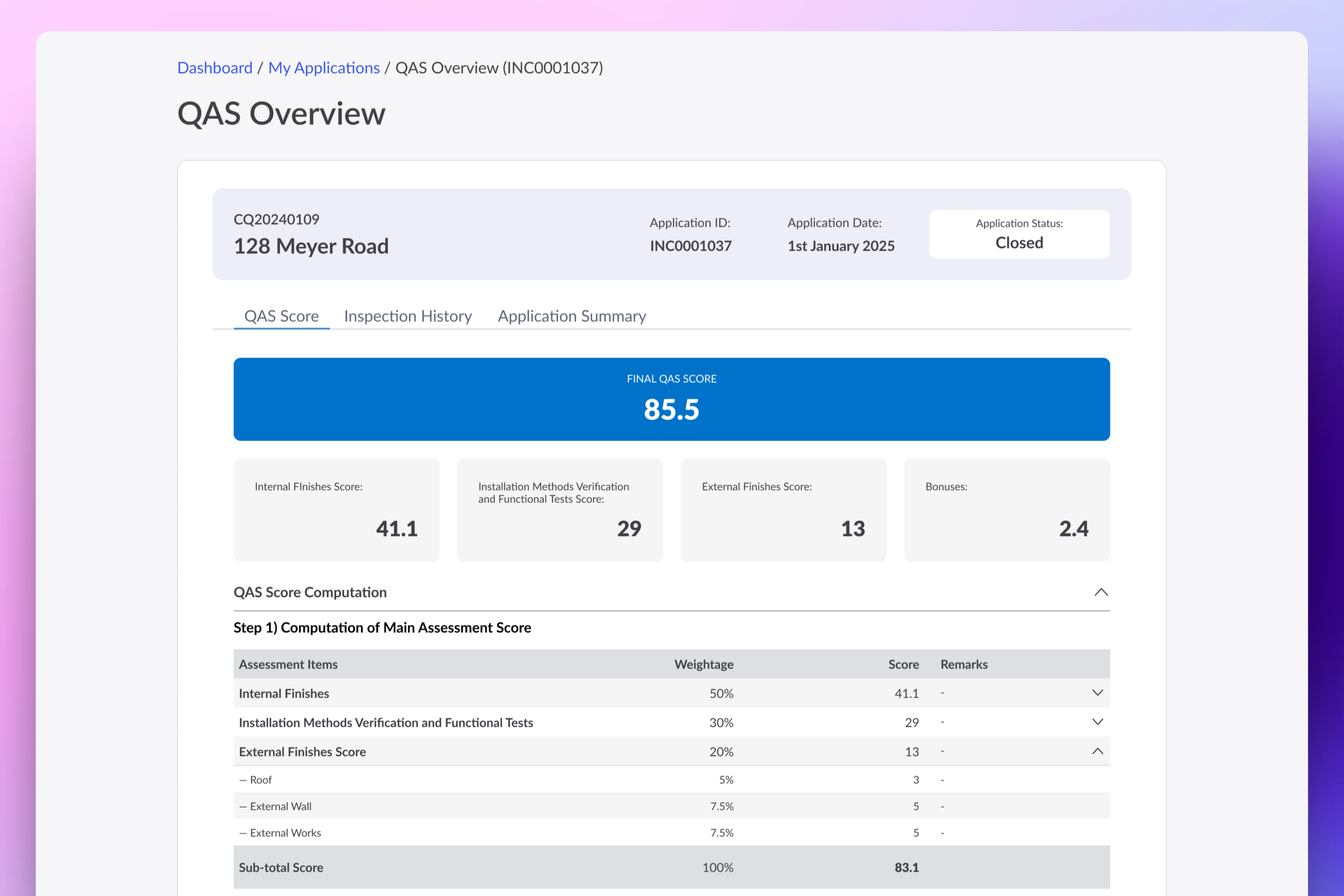
The portal connected application submission, payment, lifecycle tracking, scoring, and inspection milestones.
Reflection
Navigating high-stakes complexity. Good design in public sector portals does not mean pretending regulatory requirements are simple. Real success lies in organizing the complexity: pre-filling data to eliminate manual work, providing clear progress trackers, and giving users direct control over scheduling that was previously buried in offline emails.
Interactive alignment. When working with multiple government stakeholders, static wireframes fail to communicate system behaviour. Using interactive Storybook prototypes allowed us to resolve edge cases in payment handoffs, conditional logic, and scoring criteria before engineering began.
Contents