SpriteLab
Ship only the SVG icons your WordPress site actually uses.
A WordPress plugin that moves SVG sprite management into a safe, code-free admin workflow. SpriteLab lets builders curate, sanitise, preview, and reuse only the icons their site needs without maintaining a developer-owned pipeline.
7 min read
Impact
A technical optimisation became a builder-owned icon workflow.
SpriteLab moves SVG sprite creation into wp-admin so builders can curate, sanitise, preview, and reuse only the icons their site needs without maintaining a developer-owned pipeline.
- Builders can ship selected SVGs instead of a full icon library.
- Sanitisation warnings and previews make SVG intake more trustworthy.
- The AI-assisted build stayed anchored to product decisions and QA review.
A quick summary
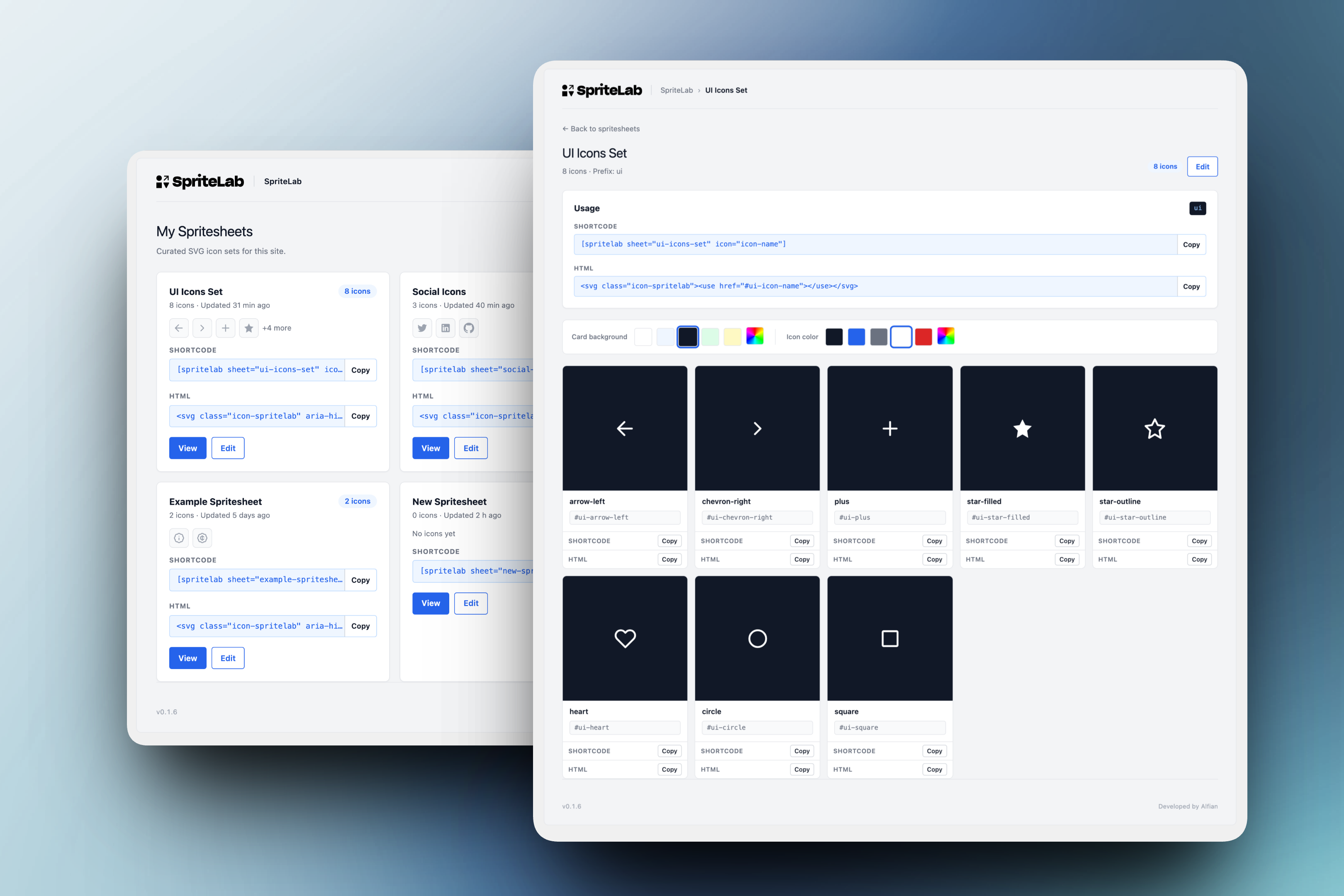
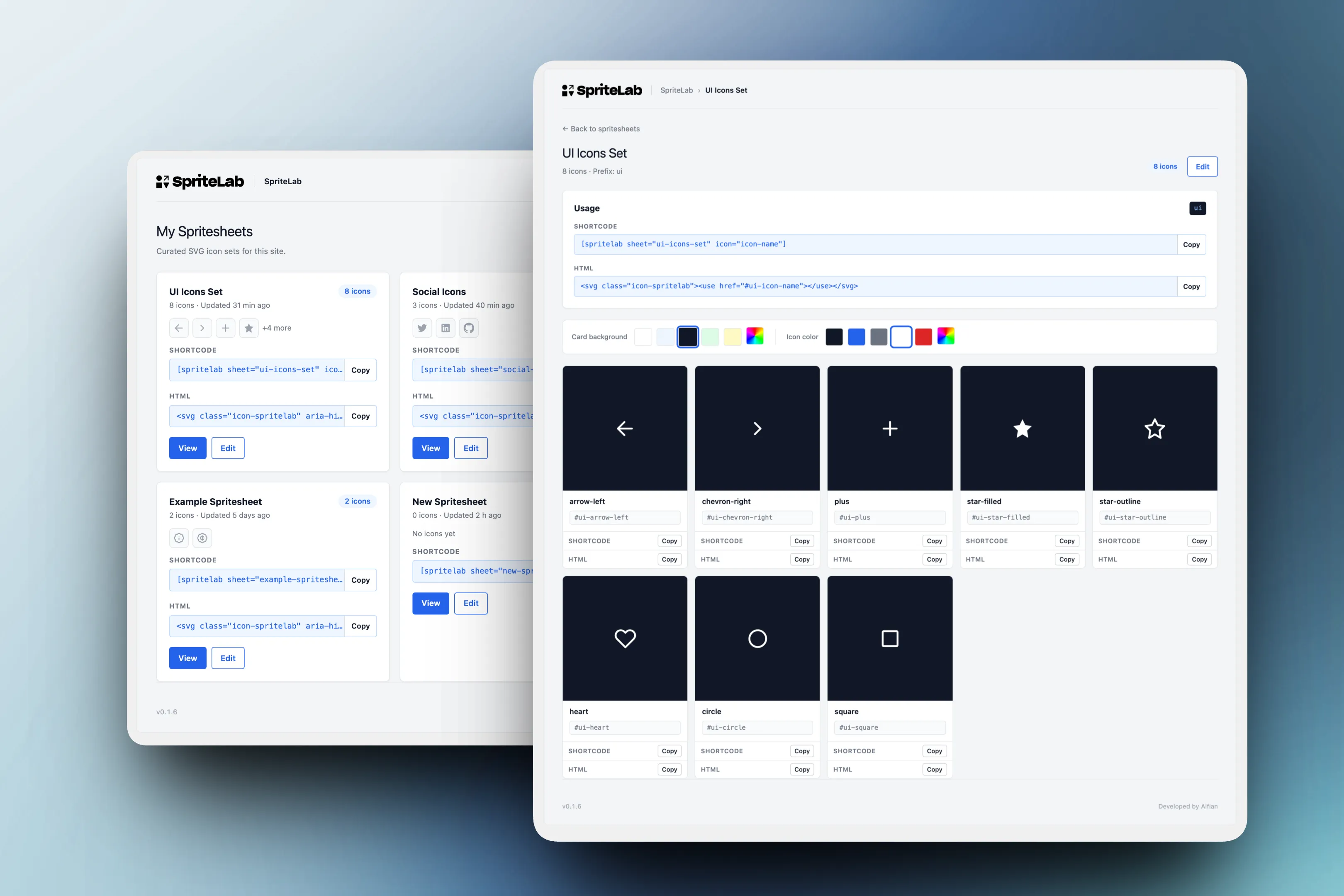
A clear product flow for SVG sprite management
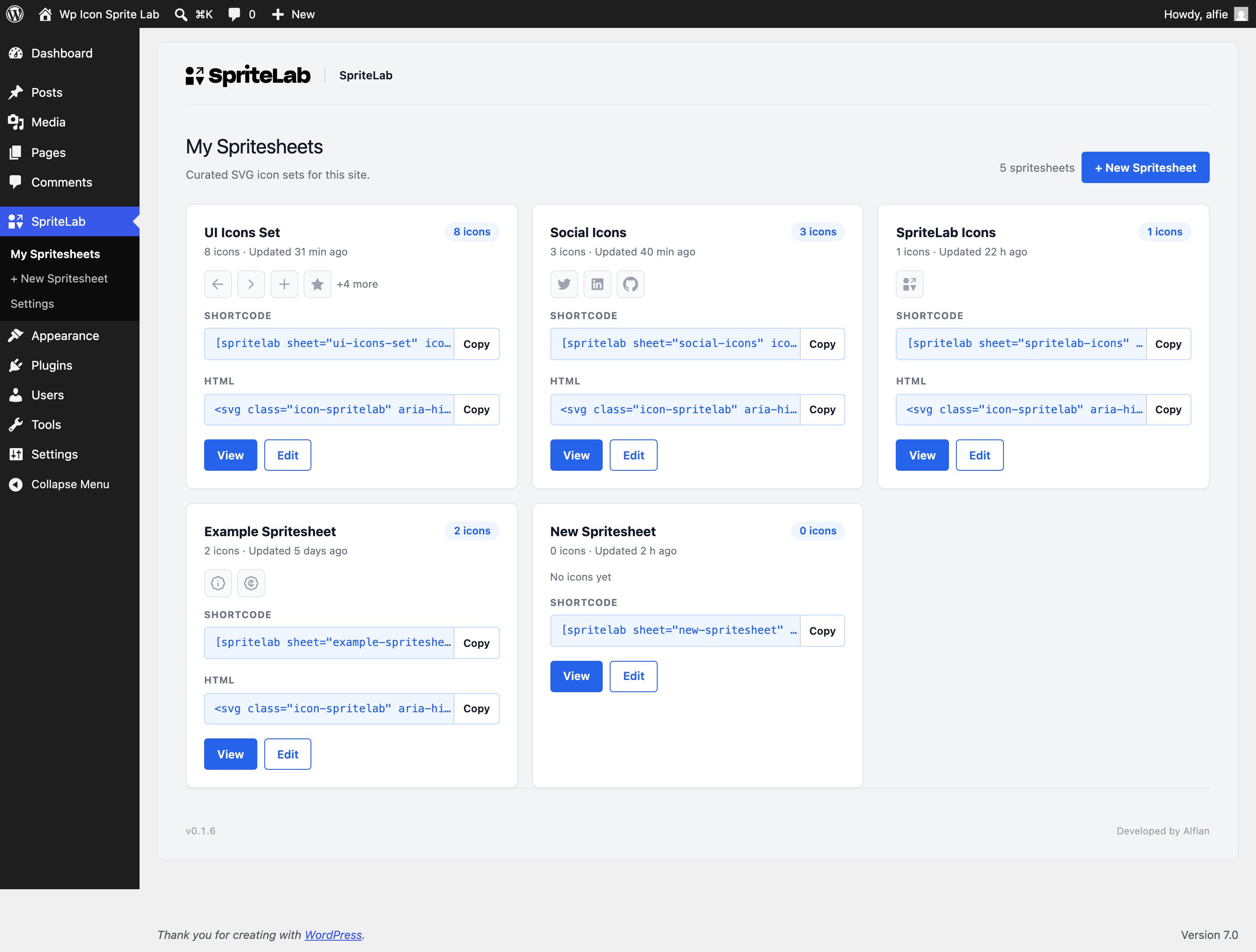
Sheets are scannable from the dashboard and previewable before integration.
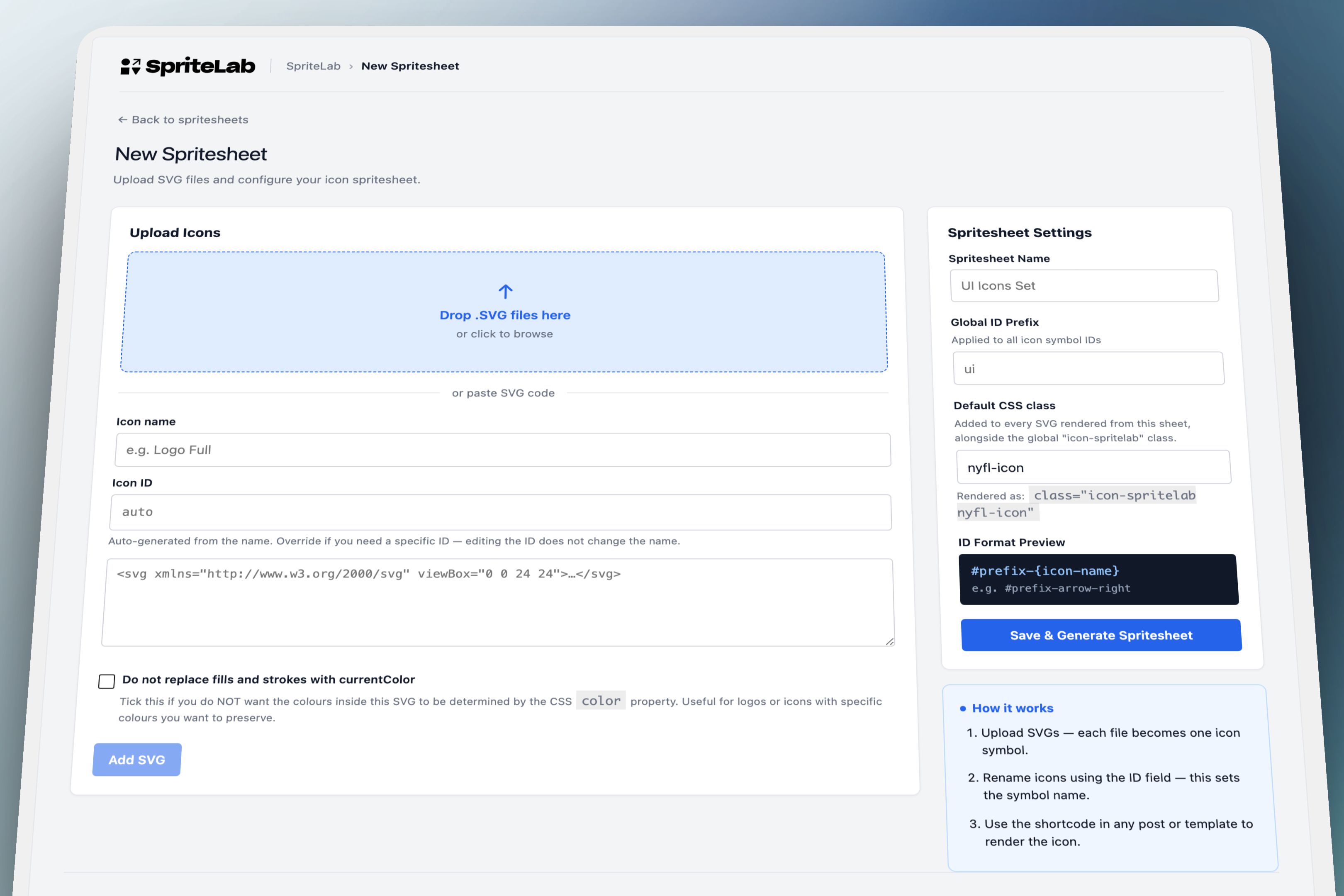
Make the first safe upload obvious
Upload, paste, naming, generated IDs, and sheet defaults live in one flow.
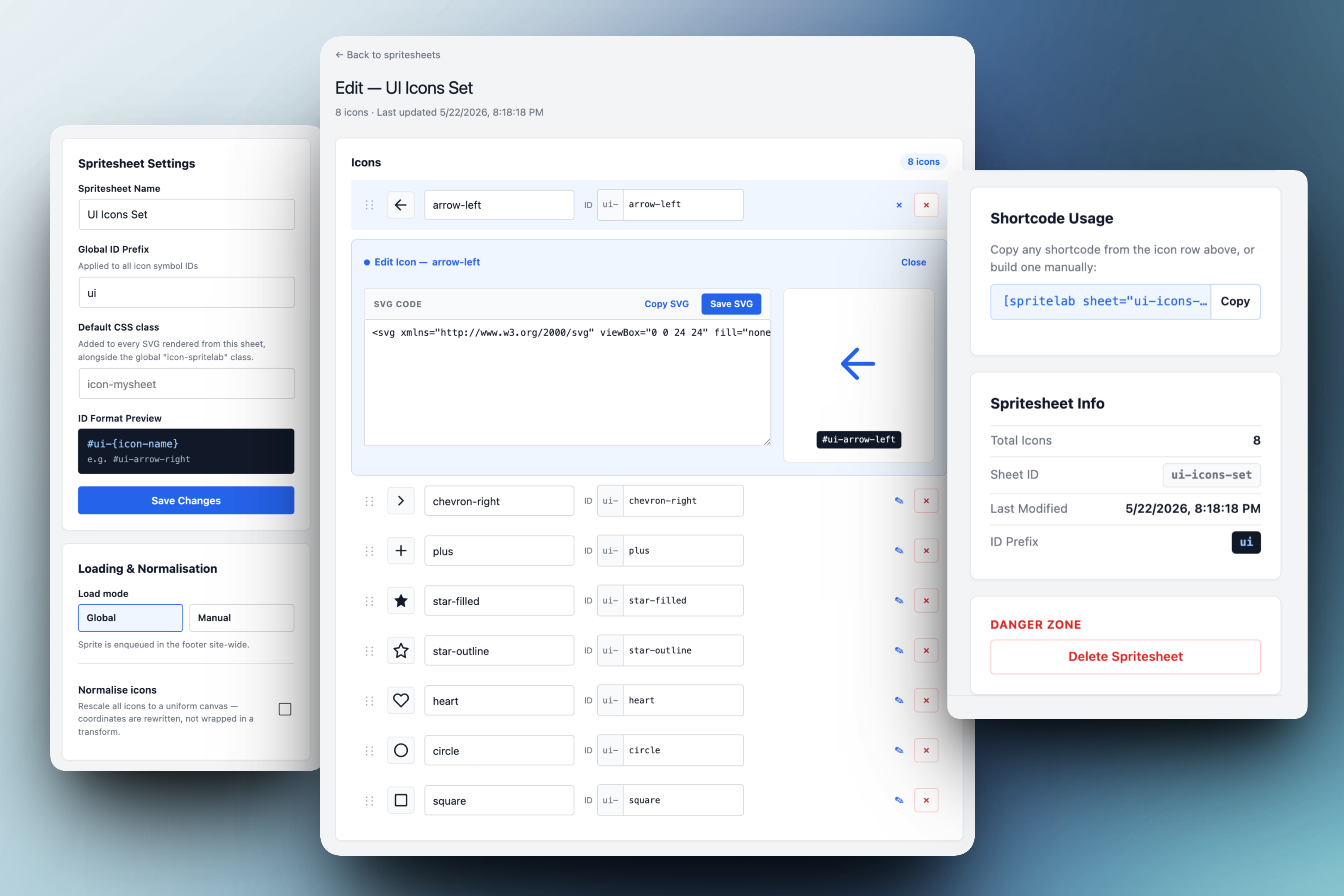
Edit icons inline, save everything at once
Icon edits, renames, and settings are tracked as drafts and saved together.
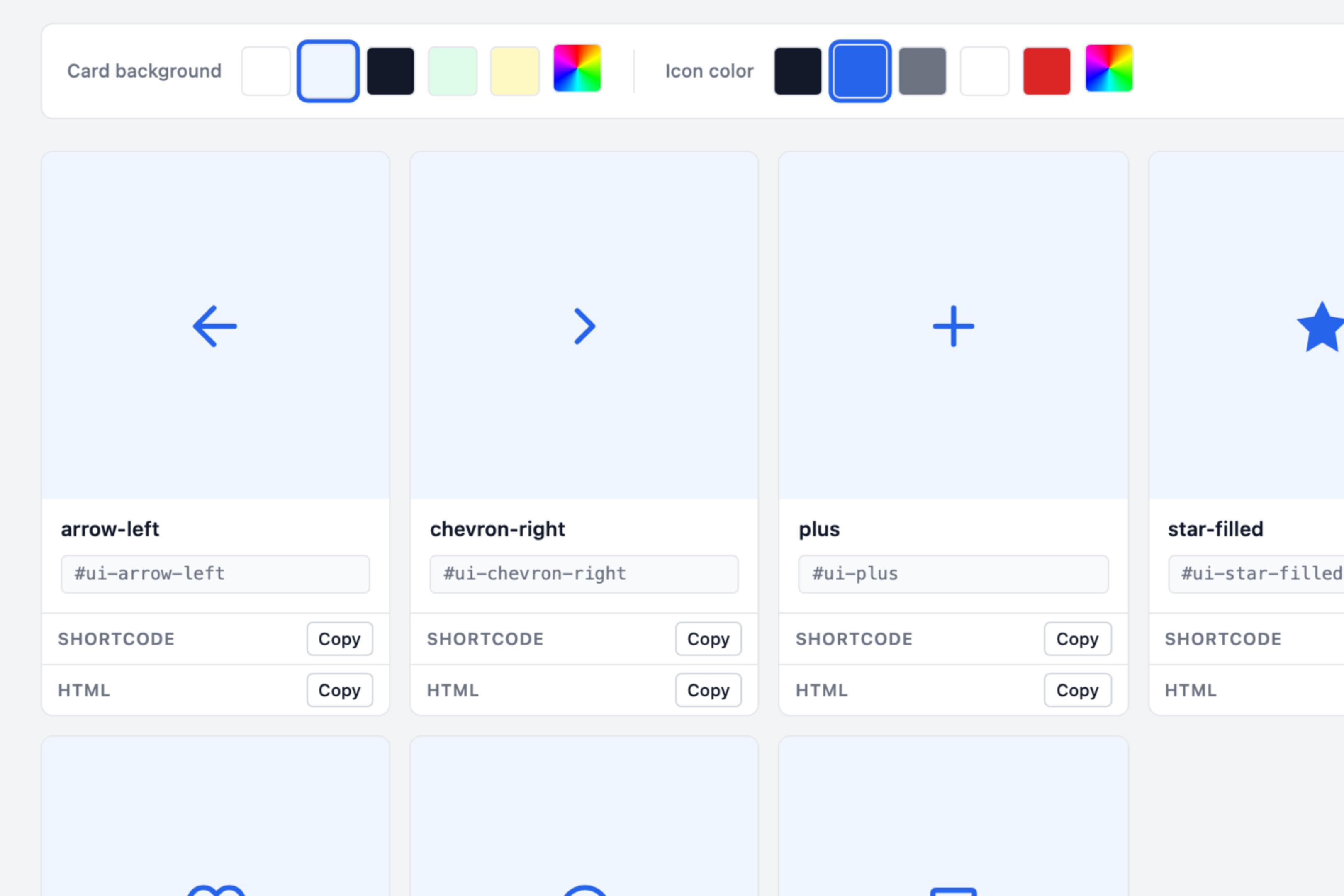
Preview the set before page integration
Colour and background swatches test the sprite before it leaves wp-admin.
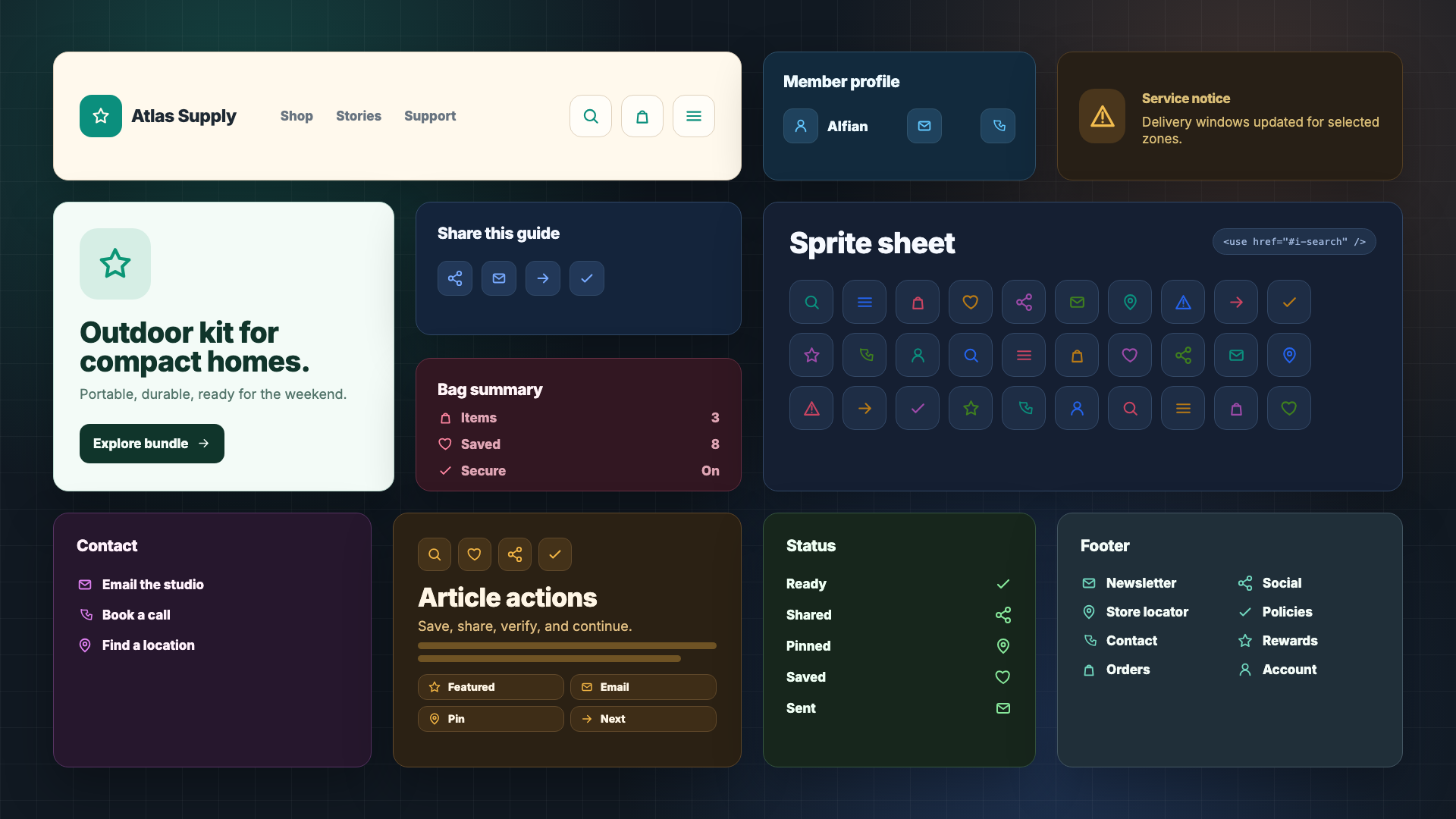
A curated sprite supports repeated interface patterns across the page
The plugin succeeds when a small generated sprite can support multiple interface moments across a live site.
Have at least 7 minutes? Read the case study below.
SpriteLab helps WordPress builders ship only the SVG icons their site actually uses.
Most WordPress sites only need a small set of UI icons. While the easy default is shipping a full 1,200-icon library, the lean option has traditionally been a developer-only SVG workflow. SpriteLab closes this gap.
Context & Problem
The problem
Small icon choices were creating unnecessary performance and maintenance tradeoffs.
WordPress builders needed a way to add one safe SVG, know how to place it, and avoid turning a small UI change into a developer-owned asset pipeline.
Library bloat
A site might use 18 icons from a 1,200-icon library. The waste is easy to ignore but common enough to matter.
Developer-owned sprites
Hand-built sprites are lean, but require file-system editing, build knowledge, and careful maintenance.
Repeated markup
Inline SVG is flexible, but repeats markup across templates and content instead of defining symbols once.
Operational Constraints:
- Zero build pipelines: Keep the entire icon workspace nested safely within standard WordPress administration (
wp-admin). - Bimodal upload support: Allow seamless drag-and-drop file uploads alongside direct SVG code pasting.
- Auditable sanitisation: Surface sanitisation changes instantly rather than mutating code silently in the background.
- Human-led AI assistance: Direct AI tools to accelerate building while keeping product judgement fully designer-owned.
The Process
I built the plugin during a solo sprint, managing IA, UI design, implementation guidance, and QA. I used Pencil early to map the first admin-screen direction: dashboard, create, edit, and view. Those wireframes helped me decide what each screen needed to protect, then the work moved through a continuous repeatable loop: define the feature, prompt AI for technical implementation , build a functional vertical slice, validate in WordPress, refine the interface, and iterate.
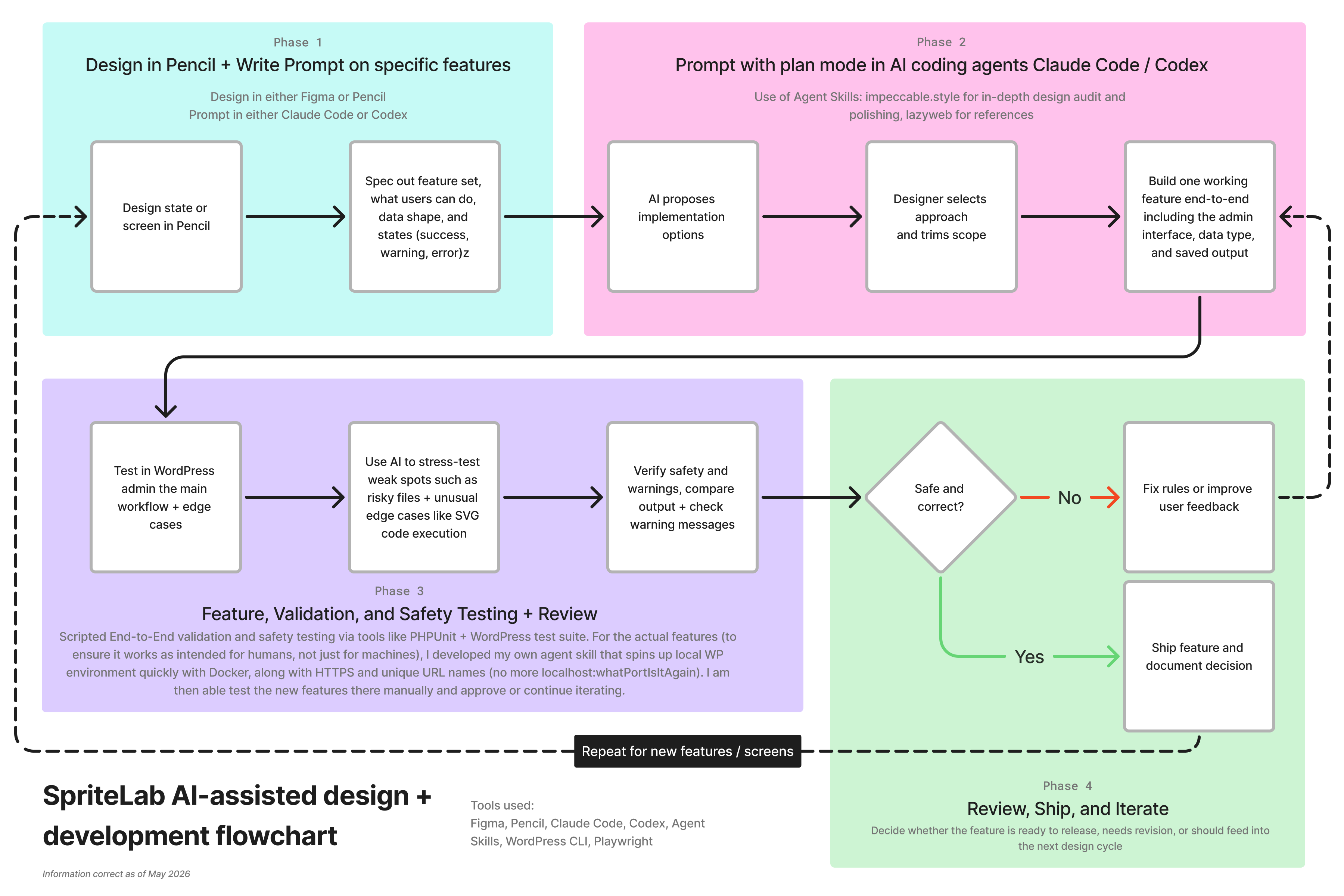
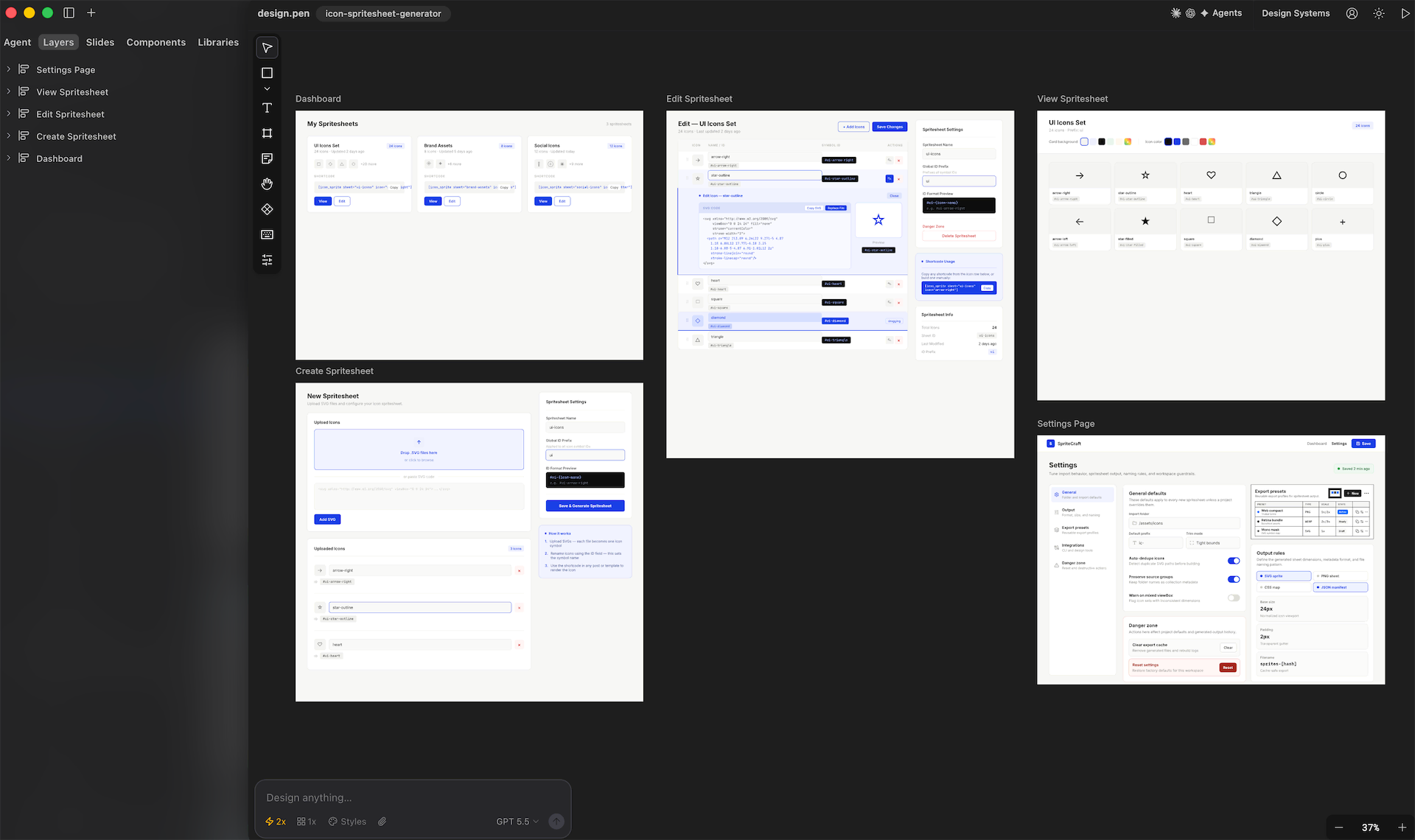
The Pencil screens were a starting point, not a frozen specification. The final product changed as I built and tested the plugin , because working implementation exposed better interaction details than the initial screens could predict.
The Pencil pass established clear screen boundaries that were refined through development:
- Dashboard protects orientation.
- Create protects first safe asset intake.
- Edit protects high-frequency icon work.
- View protects user confidence prior to page integration.
Solutions Deep Dive: Key Design Decisions
The Spritesheet as the Unit of Work
A sheet matches how builders group icons: theme UI, social icons, brand marks, or component controls. The dashboard functions as inventory, not settings. Builders can scan sheets, preview icons, copy key usage patterns, and jump directly into actions.
Preventing Security Risks Visually
Uploading an SVG is a high-risk security vector. The Create screen combines upload drag-zones, code pasting, automatic ID previews, and default sheet settings into one visual flow, preventing malicious injections.
Saving Multi-Row Refinements Concurrently
The Edit screen isolates frequent icon work from sheet-level configurations. I rewrote the core save functionality so that clicking “Save Changes” flushes all pending drafts across expanded rows concurrently—including code edits and slug renames—matching user expectation.
SVG and Swatch Previews
The View screen groups live previews, background swatches, shortcodes, and raw HTML <use> blocks together. Builders can test icons against light, dark, soft, and accent backgrounds to verify colour contrast before code integration.
The plugin succeeds when a symbol renders on the page. A small generated sprite can support repeated interface moments across a live site: navigation, profile utilities, sharing actions, checkout helpers, content cards, status states, and footer links.
Impact & Outcomes
SpriteLab moved SVG management into a safe, code-free administration workflow.
Case study snapshot
A small workflow for a real performance leak
Curated
icons, not libraries
Built for selected SVGs, not another asset library.
Safe
SVG intake
SVGs are sanitised with visible warning chips.
Efficient
admin workflow
The flow follows the real sequence: scan, add, adjust, verify.
No build
WordPress-native
Static CSS, Alpine.js, REST routes, and the Options API. Faster to ship and easier to maintain than a build step.
Outcome
SpriteLab turned a developer-owned optimisation into a builder-owned workflow.
The plugin reframed SVG sprite management as a clear product flow: curate the set, inspect the output, then copy the markup needed for the page.
Builder-owned
Icon curation moved into a safe WordPress admin workflow.
Builders can create, edit, preview, and reuse only the SVGs their site needs.
Safer intake
Sanitisation became visible instead of mysterious.
Warnings and preview states show what changed before the sprite is used on a page.
No build step
The plugin stays WordPress-native.
Static CSS, Alpine.js, REST routes, and the Options API keep the workflow inside wp-admin.
AI-assisted
Implementation moved faster without outsourcing product judgement.
AI translated implementation slices, while scope, UX decisions, safety, and release quality stayed human-owned.
The Roadmap to Version 1.0
The development roadmap remains narrow, focusing on official listing preparation and multi-site agency utility:
- Security & escaping audit: Wrapping all PHP outputs securely for upcoming WP.org directory submission.
- Import / Export engines: Creating JSON configuration exports for agencies managing identical asset suites across sites.
- Intra-sheet search indexing: Supporting real-time filtering within sheets once they exceed 20 icons.
- Licensing entitlement rails: Integrating JWT entitlements and SureCart SDK for Pro feature gating.
- Automated test coverage: Hardening the release candidate via automated Playwright and PHPUnit test suites.
Reflection
In solo product delivery with AI agents, I found that the decisive work still comes down to product clarity: knowing what to build, criticising flawed code outputs, and holding the implementation to a premium user experience bar. AI does not know the difference between good and bad user experience, it only knows good and bad code (most of the time)
Contents